
Gemini Test Automation in 2026: The Complete SDET Playbook (Playwright, Selenium, Cypress, Code Assist & FAQ)
The definitive 2026 guide to Gemini for test automation — Gemini 2.5 Pro, 3.1 Pro Preview and Code Assist for Playwright, Selenium, Cypress and WebdriverIO. RCTF prompts, POM design, CI/CD, flake triage, review rubric and every PAA question.

Last updated: July 14, 2026 · 14 min read · By SoftwareTestPilot
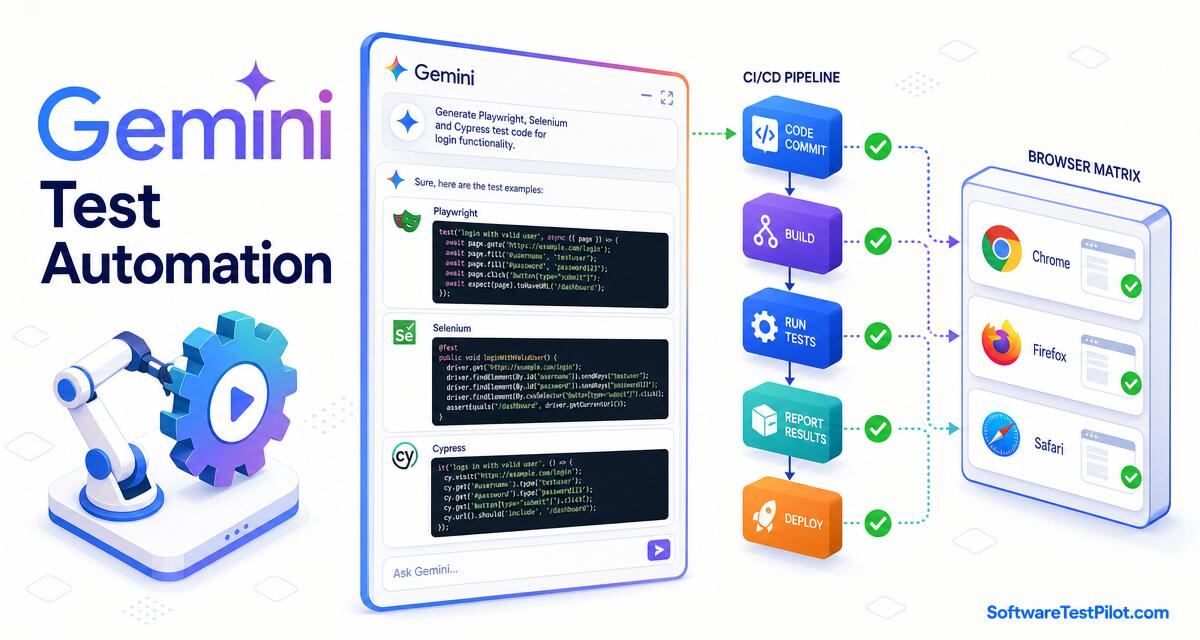
Gemini test automation is the practice of driving Gemini 2.5 Pro, Gemini 3.1 Pro Preview and Gemini Code Assist to design, generate, refactor and stabilise automated tests across the pyramid — unit, API contract, UI E2E and cross-browser — for Playwright, Selenium, Cypress, WebdriverIO, REST Assured, pytest and JUnit. Measured on 2026 teams, Gemini cuts new-suite bootstrap time from weeks to days, moves branch coverage 15–25 points in a focused sprint, and — via Gemini Code Assist's @workspace and #file context — respects the actual repo conventions rather than inventing new ones.
This pillar is the SDET's canonical reference before pointing Gemini at a Playwright or Selenium suite. Pair with Gemini for software testing, Gemini for QA testing, Claude for test automation, GitHub Copilot test automation, Playwright interview questions and Selenium interview questions.
Key takeaways
- Automation quality = locator strategy × wait discipline × data hygiene. Pin all three in the prompt.
- Gemini Code Assist is the killer surface for automation — repo-aware, VS Code / JetBrains / Android Studio, chat + inline + agentic.
- Ban
sleep,Thread.sleep,page.waitForTimeoutin prompts — force framework waits.- Wire Gemini output through CI (GitHub Actions, Cloud Build, Azure Pipelines) before you trust it locally.
- Every automation PR carries: coverage delta, flake budget, trace on retry, screenshot on failure.
1. The 2026 automation pyramid Gemini fits into
Automation follows the classic pyramid — many unit, some integration, few E2E — extended with a contract tier and an a11y tier. Gemini maps cleanly to each:
+---------------------+   Gemini surface
| E2E (UI + a11y)    |   Gemini Code Assist + Playwright/Selenium/Cypress
+---------------------+
| Contract / API     |   Gemini 2.5 Pro + Pact / REST Assured / supertest
+---------------------+
| Integration        |   Gemini 2.5 Pro + Testcontainers + MSW
+---------------------+
| Unit (bulk)        |   Gemini Code Assist + Vitest / pytest / JUnit
+---------------------+
Rule of thumb: 70% unit, 20% integration + contract, 10% E2E + a11y. Any team where E2E > 30% is heading for a flaky-test spiral — see Fowler's practical test pyramid.
2. RCTF prompting for automation
- Role — "You are a senior SDET fluent in Playwright TypeScript, page-object pattern, deterministic waits and CI stability."
- Context — paste the AC, the page object, the app URL, the auth pattern, the framework version, the browser matrix and the CI runner constraints.
- Task — "Generate a spec that logs in via storageState, covers 1 happy + 2 error + 1 a11y, uses getByRole locators only, completes under 8s in CI."
- Format — "TypeScript, Playwright, one describe per feature, trace on retry, screenshot on failure. End with a 7-point rubric self-critique."
3. Gemini Code Assist — the SDET's in-editor surface
Gemini Code Assist ships as a VS Code / JetBrains / Android Studio extension and a CLI. See the official Gemini Code Assist docs. Key commands for SDETs:
# In Gemini Code Assist chat, with the file open:
/tests   -> generate tests for the selected code
/fix     -> propose a fix for the current failing test
/explain -> explain what the selected code does
/doc     -> add docstring / JSDoc that later improves test context

@workspace how does UserService.getById flow through the checkout?
@workspace generate integration tests for the checkout flow
#file:src/services/user.ts  -> explicit file reference in a prompt
#selection                  -> reference the currently-highlighted code
Rule of thumb: /tests for unit, @workspace for integration, chat + agentic mode for E2E and coverage sprints.
4. Ten copy-paste Gemini prompts for automation
Prompt 1 — Playwright spec from an AC
Role: senior SDET, Playwright TS.
Context: AC = <paste>. POM = <paste>. Auth = storageState.
Task: spec with 1 happy + 2 error + 1 axe check. getByRole only.
No page.waitForTimeout. Trace on retry, screenshot on failure.
Format: single .spec.ts. Rubric self-critique.
Prompt 2 — Selenium 4 Java + TestNG
Role: senior SDET, Selenium 4, Java 21, TestNG.
Context: POM = <paste LoginPage.java>. App = <URL>.
Task: LoginTest.java — valid, invalid password, locked, SSO redirect.
WebDriverWait — no Thread.sleep. ITestListener screenshot on fail.
Format: full .java file.
Prompt 3 — Cypress spec with fixtures
Role: senior SDET, Cypress 13.
Context: page = /checkout, fixtures/cart.json = <paste>.
Task: spec — happy path + empty cart + expired card.
Use cy.intercept for /pay, cy.session for auth. No cy.wait(ms).
Format: .cy.ts file.
Prompt 4 — REST Assured contract test
Role: API SDET, REST Assured 5, Java 21.
Context: OpenAPI 3.1 for POST /orders = <paste>.
Task: 201 happy, 400 missing body, 401 no token, 409 dup idempotency,
JSON Schema validation. AssertJ assertions.
Format: full .java file.
Prompt 5 — page object refactor
Role: senior SDET.
Context: current spec = <paste>. Selectors are fragile xpath.
Task: refactor to a POM. All locators via getByRole / data-testid.
One public method per user intent.
Format: LoginPage.ts + login.spec.ts.
Prompt 6 — GitHub Actions workflow
Role: SDET, GitHub Actions.
Context: repo = pnpm monorepo, Playwright, 3 shards.
Task: .github/workflows/e2e.yml — matrix (chromium, firefox, webkit),
sharding, cache, upload trace + HAR on fail, junit report.
Format: YAML.
Prompt 7 — flaky-test triage
Role: senior SDET, Playwright flake expert.
Context: spec = <paste>, fails 1 in 20 runs, trace = <paste event log>.
Task: identify the race, propose deterministic rewrite. No sleeps, no
retry loops around assertions. Cite the exact Playwright API used.
Prompt 8 — visual regression setup
Role: SDET, Playwright + toHaveScreenshot.
Task: baseline strategy — mask dynamic regions, threshold 0.2,
per-project snapshots for chromium+webkit, CI update workflow.
Format: config snippet + one example spec + docs paragraph.
Prompt 9 — accessibility sweep
Role: SDET + a11y specialist.
Task: add @axe-core/playwright checks to every page-level spec under
tests/e2e. Fail on serious/critical only. Do not change existing
assertions. Output a diff patch.
Prompt 10 — cross-browser matrix
Role: SDET.
Context: current playwright.config.ts = <paste>.
Task: extend projects to chromium + firefox + webkit + Mobile Chrome
(Pixel 7) + Mobile Safari (iPhone 15). Retain traceViewer on retry.
Format: playwright.config.ts diff.
5. The 7-point review rubric for Gemini-drafted automation
- Deterministic — no sleeps, no
Date.now()without a clock, no network without a mock. - One reason to fail — single assertion cluster; failure points to one behaviour.
- Failed first — comment out impl; the test must fail. Otherwise it is a tautology.
- Edge cases named — null, empty, boundary, unicode, timezone, concurrency covered.
- No leaked secrets — no real tokens, PANs, customer emails.
- Framework idiomatic —
getByRolenot xpath,expect(locator).toHaveTextnot manual polling. - CI-safe — completes under the shard budget; produces trace on retry, screenshot on failure, junit XML.
6. Governance, PII and CI wiring
Gemini in 2026 ships in three surfaces relevant to QA — gemini.google.com (chat + Deep Research + Canvas), the Gemini API in Google AI Studio and Vertex AI, and Gemini Code Assist (VS Code / JetBrains / IntelliJ + Android Studio + the CLI). All three respect the Google Cloud terms: paid Gemini API traffic and Google Workspace-connected Gemini (Business / Enterprise) do not train Google models. Free consumer gemini.google.com traffic may be used to improve models unless the user opts out.
- Use paid Gemini API, Vertex AI, or Gemini for Google Workspace (Business / Enterprise) — not the free consumer plan — for anything touching customer data.
- Never paste raw production data, HAR files, JWTs, PANs or customer PII. Redact with the rules from the ChatGPT bug report pillar.
- Prefer the Gemini API with a Cloud Logging audit trail; keep prompts and outputs in a QA prompt library under version control.
- Map governance to the NIST AI RMF and the EU AI Act for regulated products.
- Add an "AI attribution" section to your PR / test plan template; a human SDET signs off before merge.
7. ROI — what Gemini saves on automation
Annual ROI = (New specs/year × time saved per spec × loaded SDET cost)
           + (Flaky-test hours reclaimed × loaded engineering cost)
           + (Coverage delta × escape-defects avoided × incident cost)
           − (Gemini Code Assist / API cost)
           − (Review overhead: ~15% of "time saved")
Honest 2026 ranges: new-spec authoring drops 55–70%; flaky rate drops 30–50% with a "no sleeps" prompt; branch coverage on legacy modules climbs 15–25 points in a Gemini Code Assist coverage sprint. Diminishing returns past ~80% coverage.
8. Gemini Code Assist vs Copilot Agent Mode vs Claude Code
- Gemini Code Assist — VS Code / JetBrains / Android Studio; strongest in Google Cloud + Android ecosystems; tight Vertex AI integration for enterprise; native Google Workspace context.
- GitHub Copilot Agent Mode — editor-first, tightest to the GitHub PR workflow. Ideal for repos already on GitHub.
- Claude Code — terminal-first agentic CLI, strongest at long agentic loops (coverage sprints, migrations).
Most 2026 SDET teams pick one primary editor assistant based on their stack — Android + Google Cloud shops lean Gemini Code Assist; GitHub-native shops lean Copilot; CLI-first shops lean Claude Code.
9. What this means for SDET careers
SDETs who can drive Gemini Code Assist across VS Code, JetBrains and CLI to lift coverage without shipping tautologies are the ones dev leads keep on the roadmap. See the QA salary guide, the SDET career roadmap, the AI mock interview, the free ATS resume review and live roles on the QA Jobs Radar.