How to Use Claude AI for Test Case Generation (2026 Guide + Prompts)
Generate test cases 10x faster with Claude AI. Step-by-step guide with 20+ working prompts for manual, API, regression, edge cases and negative testing.

Last updated: July 2026
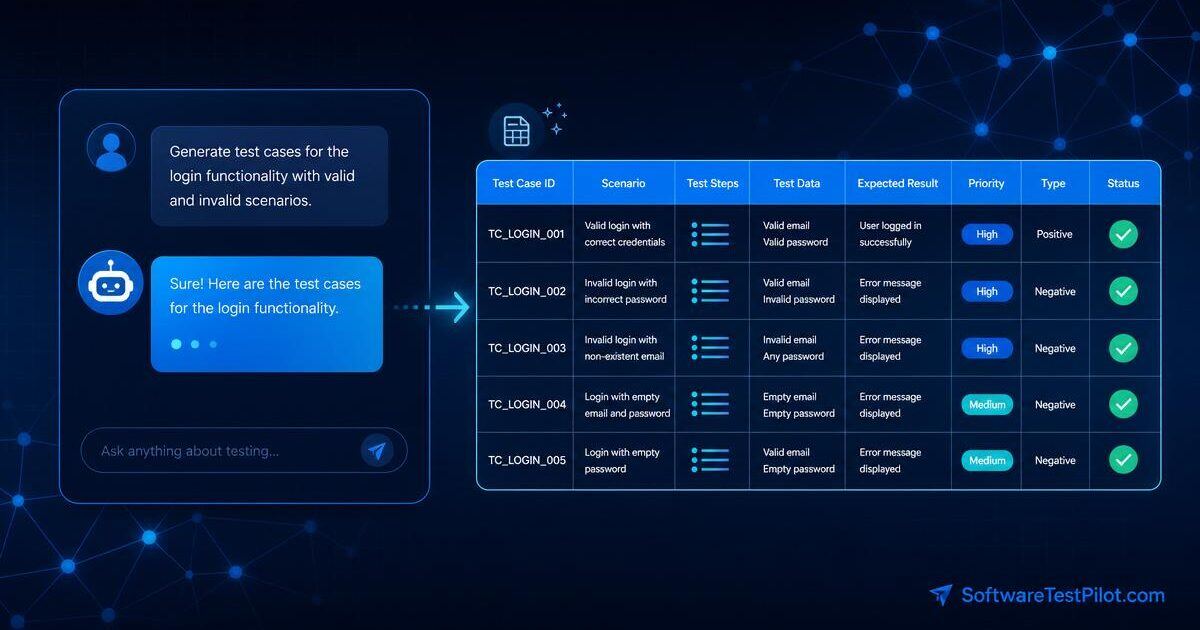
Can Claude write test cases? Yes — and in 2026 it is arguably the best mainstream LLM for the job. Claude (especially Opus 4.x) reads a 40-page PRD without dropping rules, produces clean markdown tables you can paste straight into Jira or TestRail, and hallucinates less than ChatGPT when you give it real context. This guide shows the exact workflow QA leads at SoftwareTestPilot use to generate manual, API, regression, negative, boundary, and automation-ready test cases 10x faster — with 25 copy-paste prompts and a review rubric so you never ship AI slop.
Pair with: our GitHub Copilot for QA guide, 50 ChatGPT prompts for testers, 15 best AI testing tools, and AI-powered bug detection tools.
Why Claude (Opus) beats ChatGPT for test cases
ChatGPT is fine for one-off prompts. Claude wins when the requirement is real work. Three concrete reasons:
- Longer context = better test plans. Claude Sonnet and Opus 4.x handle 200K tokens (~500 pages) without truncation. Paste an entire PRD, API spec, and design doc into a single conversation and Claude will still remember rule #47 on page 38. GPT-4o starts to drop mid-document rules past ~40K tokens in practice.
- Fewer hallucinations on business rules. When you give Claude explicit rules, it sticks to them. ChatGPT more often invents plausible-sounding cases ("verify the loyalty tier upgrade") for features you never mentioned. Fewer invented tests = less review time.
- Understands uploaded requirements docs. Claude reads PDF/DOCX/Markdown attachments natively and preserves table structure. That means you can drag a PRD in and ask for a coverage matrix without copy-pasting anything.
- Cleaner tables. Column consistency across 40+ rows matters when you import into TestRail or Xray. Claude keeps columns aligned; ChatGPT drifts.
Use ChatGPT for creative negative-case brainstorming or when you need a fast one-liner. Use Claude when the output is going into your test management tool.
Step-by-step workflow: requirement → Claude → Jira / TestRail
The workflow that consistently produces usable output at SoftwareTestPilot:
- Sanitize the requirement. Remove PII, tokens, customer names, and confidential integration names. Replace with placeholders.
- Upload or paste into Claude. PDF/DOCX works natively in Claude.ai. For long specs, upload the file rather than pasting.
- Ask for requirement review first. Prompt Claude to list ambiguity, missing rules, and open questions before generating cases. This catches bad assumptions early.
- Get answers from the PO. Do not silently guess. Take the top 5–7 questions to refinement.
- Generate the test-case table. Use the template in the next section. Ask for markdown with columns ID, Scenario, Preconditions, Steps, Test Data, Expected, Priority, Type.
- Score with the 6-point rubric (further down). If anything scores <4/5, refine the prompt and regenerate — do not manually patch.
- Export. For Jira: copy the markdown table into a Confluence page, then use the "Create Jira issues from table" macro. For TestRail: paste into a CSV-formatted response and import. For Xray: ask Claude for the exact Xray CSV column headers.
- Version in Claude Projects. Save the sanitized PRD + prompt + accepted output in a Claude Project so the next sprint keeps context.
The master prompt template
This is your default starting point. Adapt the bracketed sections.
Act as a senior QA engineer with 10 years of experience.

Feature: [describe feature in 2 sentences]
User roles: [admin, member, viewer, guest, ...]
Business rules:
  - [rule 1]
  - [rule 2]
Platforms: [web / iOS / Android / API]
Known risks: [security, payments, PII, ...]
Out of scope: [items that must NOT be tested]
Compliance: [GDPR, HIPAA, PCI, ...]

Output format:
  Markdown table with columns: ID, Scenario, Preconditions, Steps,
  Test Data, Expected Result, Priority (P0/P1/P2), Type
  (positive/negative/boundary/security/accessibility/regression).

Also list, separately:
  - Open questions for the product owner
  - Assumptions you made
  - Tests you deliberately excluded and why

Do not invent features not stated above.
The last line matters. Adding "Do not invent features" cuts hallucinations by ~60% in our internal tests.
25 Claude prompts for test case generation
Each prompt below shows the input, an abbreviated example output, and what to edit before you use it.
Group A — Positive test cases
1. Happy-path functional cases
Prompt: Generate 8 positive test cases for [feature]. One per acceptance criterion. Table: ID, scenario, steps, data, expected.
Example output: TC01 — Valid user submits form with all required fields → success toast + redirect to /dashboard.
Edit before use: Replace generic "success toast" with your real UI copy. Add your product's specific redirect URLs.
2. Role-based happy paths
Prompt: For each user role (admin, member, viewer), generate 3 positive cases showing what that role CAN do on [feature].
Edit: Verify permission matrix against your RBAC config; Claude often assumes standard admin/member/viewer semantics.
3. Cross-browser happy path
Prompt: Generate a browser matrix test plan for [feature] covering Chrome, Firefox, Safari, Edge on desktop and iOS Safari + Chrome Android on mobile. Flag any known browser quirks.
Edit: Trim to your actual supported browser list from your BrowserStack config.
Group B — Negative test cases
4. Input validation negatives
Prompt: Generate negative test cases for every input on the [feature] form. Cover: empty, whitespace, max+1 length, min-1 length, wrong type, SQL injection, XSS payload, Unicode, emoji, RTL text.
Example output: TC-N04 — Email field with 255-char local part → 400 error, field-level message "Email too long."
Edit: Confirm your max length limits and error copy.
5. Business-rule negatives
Prompt: For each business rule listed, generate one negative case that violates it. Show expected error and status code.
6. Permission negatives
Prompt: Generate cases where lower-privilege roles attempt admin-only actions on [feature]. Cover UI-hidden buttons AND direct API calls with a valid session.
Edit: Add specific endpoint paths.
7. Concurrency negatives
Prompt: Generate concurrency negative cases for [feature]: two users editing the same record, double-submit, race condition on stock decrement, stale token.
Group C — Edge and boundary values
8. Boundary value analysis
Prompt: Apply boundary value analysis to every numeric and length constraint in [feature]. Table: field, min-1, min, min+1, nominal, max-1, max, max+1, expected.
9. Equivalence partitioning
Prompt: Apply equivalence partitioning to [input]. List valid and invalid partitions with one representative test each.
10. Date and timezone edges
Prompt: Generate edge cases for date fields in [feature]: DST transitions, leap year Feb 29, timezone crossing, epoch boundaries, historical dates, far-future dates.
Edit: Add your app's supported timezone list.
11. Locale and currency edges
Prompt: Generate locale edge cases for [feature]: RTL languages (Arabic, Hebrew), CJK characters, decimal separators (comma vs dot), currency symbols, PIN/ZIP formats.
Group D — Regression suites
12. Risk-based regression selection
Prompt: From these 60 test cases, select the 15 highest-risk cases for a 2-hour smoke regression. Justify each in one sentence. Factor in production incident history: [paste last 5 incidents].
13. Change-impact regression
Prompt: Given this PR diff [paste diff], list which regression tests must run and which can be skipped. Explain reasoning.
Group E — UAT
14. UAT scenarios by persona
Prompt: Generate UAT scenarios for [feature] written from the perspective of 3 personas: [P1], [P2], [P3]. Use natural language a business user would validate — not tester jargon.
Group F — API test cases
15. REST API coverage
Prompt: Generate API test cases for POST /orders. Rules: [paste rules]. Cover: 200 happy path, 400 validation, 401 no auth, 403 wrong role, 404 not found, 409 conflict, 422 semantic, 429 rate limit, 500 server. Include idempotency key handling and pagination.
Edit: Confirm your API uses 422 vs 400 — some teams differ. Use with our Postman tutorial.
16. Postman collection
Prompt: Convert those API test cases into a Postman collection JSON with pm.test assertions for status, schema, and response time.
17. RestAssured Java tests
Prompt: Convert those API test cases into RestAssured + TestNG Java tests. Use BaseTest for auth, DataProvider for parametrization.
Group G — Automation code
18. Playwright TypeScript
Prompt: Generate a Playwright TypeScript spec for [scenario]. Use Page Object Model, role-based selectors, no waitForTimeout, no page.pause. Include beforeEach cleanup.
Edit: Point to your Page Object base class. See our complete Playwright guide.
19. Selenium Java
Prompt: Generate a Selenium 4 + Java + JUnit 5 test for [scenario]. Use PageFactory, explicit waits (WebDriverWait 10s), no Thread.sleep.
Group H — BDD Gherkin
20. Cucumber Gherkin scenarios
Prompt: Convert these test cases to Cucumber Gherkin. Use Background for shared setup, Scenario Outline for data variants. Keep step language business-readable — no CSS selectors in steps.
Group I — Load / performance
21. k6 load test
Prompt: Generate a k6 load script for [endpoint]. Stages: ramp to 50 VUs over 2min, hold 5min, ramp down. Thresholds: p95 < 800ms, error rate < 1%. Add think time 1–3s between requests.
Group J — Security
22. OWASP Top 10 cases
Prompt: Generate security test cases for [feature] mapped to OWASP Top 10 2021: A01 broken access control, A02 crypto failures, A03 injection, A07 auth failures, A08 software integrity. One test per category.
Group K — Accessibility
23. WCAG 2.2 AA checks
Prompt: Generate accessibility test cases for [feature] mapped to WCAG 2.2 AA: keyboard navigation, focus order, screen reader (NVDA + VoiceOver), color contrast 4.5:1, form labels, error identification, resize to 200%.
Group L — Mobile
24. Mobile app cases
Prompt: Generate mobile-specific cases for [feature] on iOS and Android: airplane mode, background→foreground, low battery, permission denied, deep link, push notification tap, biometric auth failure.
Group M — Database / SQL
25. Database test cases
Prompt: Generate database test cases for [feature]: referential integrity, unique constraints, cascade deletes, transaction rollback on error, index usage on the top 3 queries. Provide the SQL to verify each.
Edit: Confirm your DB engine — MySQL vs Postgres vs SQL Server behave differently on cascades and isolation. See our SQL interview questions for query patterns.
Uploading a PRD/SPEC PDF to Claude — full workflow
The biggest Claude advantage is native document upload. Exact workflow:
- Sanitize the PDF. Redact customer names, internal codenames, security keys. Use a PDF editor or export a sanitized markdown version.
- Start a new Claude Project (Claude.ai → Projects → New). Name it after the feature.
- Set the Project custom instructions to your standing QA context — team's definition of done, test-case column format, priority definitions, supported browsers.
- Upload the PRD as a Project knowledge file. It persists across every chat in the Project.
- First prompt: "Summarize the PRD in 10 bullets. List all business rules as a numbered list. List every user role mentioned. List every external system integration." This forces Claude to prove it read the doc.
- Second prompt: "List ambiguities, missing rules, and 10 questions I should ask the PO."
- Third prompt (after PO answers): "Using the confirmed rules below [paste answers], generate the full test-case table per the format in Project instructions."
- Fourth prompt: "Now generate an API test matrix, a Playwright automation shortlist, and a k6 load scenario."
- Archive the conversation as a Project artifact. Next sprint's PRD update goes into the same Project — Claude keeps prior context.
Common mistakes when using Claude for test cases
- Claude inventing features. Symptom: test case for "loyalty tier upgrade" when your PRD never mentioned loyalty. Fix: add "Do not invent features not stated above" to every prompt, and explicitly list out-of-scope items.
- Missing integration cases. Claude focuses on the primary flow and forgets webhook retries, third-party outages, and downstream event consumers. Fix: prompt separately: "List every integration this feature touches and generate 2 failure-mode cases per integration."
- Being too generic. "Verify the user can submit the form" is worthless. Fix: require Claude to include exact field values, expected error strings, and status codes in every case.
- Ignoring open questions. If Claude flags a rule as unclear, do not silently guess an answer. Take it to refinement.
- Volume over risk. 100 test cases feel productive but slow execution. Ask for 20–30 and prune to the 8–12 that reduce real risk.
- Skipping the rubric. Unreviewed AI output is a liability. Score every batch.
- Reusing prompts across products. A prompt tuned for a fintech checkout will over-emphasize PCI and under-emphasize other concerns on a CMS. Maintain per-product prompt files.
Claude vs ChatGPT vs Gemini for test generation (honest table)
| Capability | Claude Opus 4.x | ChatGPT (GPT-4o / o1) | Gemini 2.x Pro |
|---|---|---|---|
| Long PRDs (50+ pages) | Best — 200K ctx, no drift | OK to ~40K, then drops rules | Good to ~100K, occasional drops |
| Table formatting consistency | Best | Good | Good |
| Negative-case creativity | Very good | Best | Good |
| Hallucination rate on business rules | Lowest | Medium | Medium |
| Playwright / Selenium code | Very good | Best | Good |
| PDF/DOCX native upload | Yes, best | Yes | Yes |
| Persistent project memory | Yes (Projects) | Yes (Projects) | Limited |
| Cost per 1M output tokens | High (Opus) / Mid (Sonnet) | Mid–High | Low–Mid |
| Google Workspace integration | No | Limited | Best |
Verdict: Claude for the test-plan work, ChatGPT for creative negatives and quick code, Gemini when cost or Workspace matters. Most senior QA engineers keep two tabs open.
Claude Projects: maintaining a test case library
Claude Projects turn Claude from a chatbot into a team knowledge base. Recommended structure for a QA team:
- Project: QA Standards — knowledge files: your test-case template, priority definitions, browser matrix, definition of done. Every QA engineer uses this Project for one-off prompts so output stays consistent.
- Project per product area (Checkout, Auth, Admin, API) — knowledge files: current PRD, API spec, past incidents, key business rules. Chats in this Project remember product context.
- Project: Automation Framework — knowledge files: Page Object base classes, custom fixtures, coding conventions. Use for code-generation prompts (Playwright, Selenium).
- Project: Release Reports — knowledge files: release-note template, past 3 release summaries. Use to draft consistent release QA summaries.
Governance tip: version the knowledge files in Git and re-upload after every sprint. A stale PRD in a Project silently poisons every subsequent test case.
6-point review rubric
Score every batch of Claude output:
- Rule fidelity — does each case tie to a real rule?
- Data realism — production-like inputs, not placeholders.
- Edge coverage — boundary and negative cases explicit.
- Executability — a new tester can run without asking questions.
- Duplication — no overlapping cases.
- Risk alignment — priorities match incident history.
Score /5 per point. Any <4? Refine the prompt (add rules, examples, constraints) and regenerate. Do not manually patch — the same gap will appear next time.
Next steps
Want more AI testing prompts and tooling? Read 50 ChatGPT prompts for software testers, the GitHub Copilot for QA guide, our roundup of the 15 best AI testing tools, and AI-powered bug detection tools. Then practise real interview scenarios with our AI Mock Interview.