Using GPT-4 & LLMs in QA Pipelines (2026 Practical Guide)
Learn how QA teams use GPT-4, Claude, Gemini, and open-source LLMs for test generation, failure analysis, and synthetic test data.

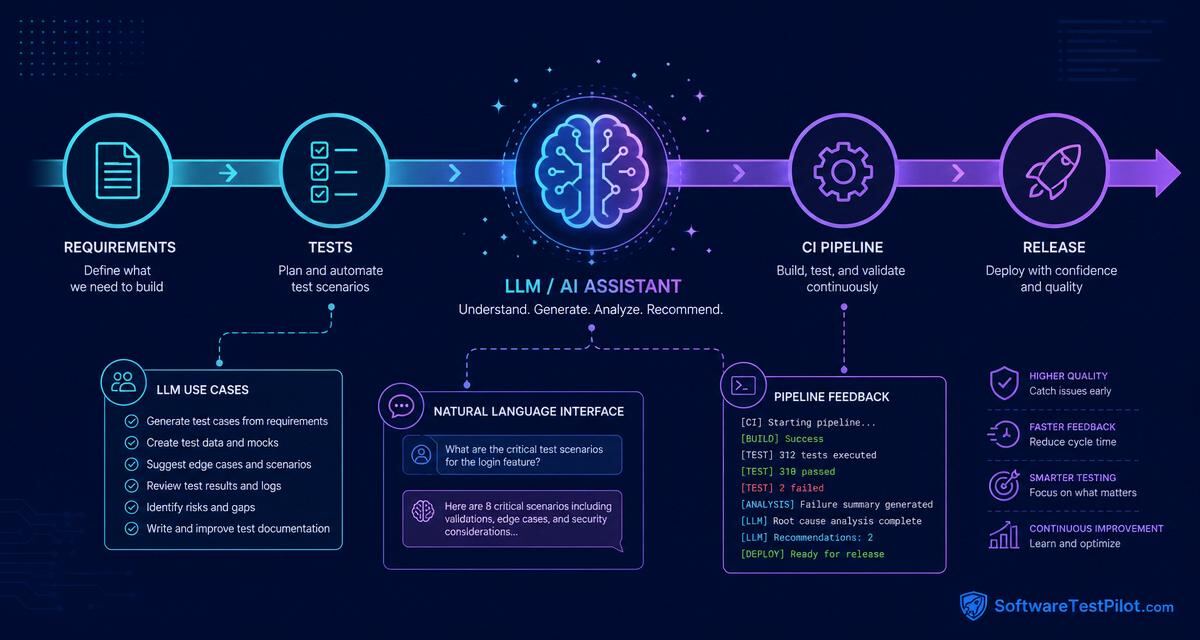
Large language models, often called LLMs, are becoming part of QA pipelines. They can summarize requirements, generate test ideas, review automation code, classify test failures, explain logs, draft release notes, and highlight risk before a release. Used well, they reduce repetitive work and help testers focus on judgment. Used badly, they create false confidence and noisy documents.
This guide explains how QA teams can use GPT-4 style models and similar LLMs inside testing workflows without losing control of quality decisions. The main idea is simple: use LLMs for assistance, not authority.
SoftwareTestPilot tip: Pair this guide with our AI Mock Interview, QA Resume ATS Review, and Playwright interview questions to turn theory into portfolio-ready practice.
Where LLMs fit in the QA pipeline
A modern QA pipeline has many stages: requirement review, test planning, test case design, automation development, CI execution, failure triage, release reporting, and production feedback. LLMs can support each stage, but the type of support changes.
During requirement review, an LLM can identify ambiguity and missing rules. During test design, it can generate coverage ideas. During automation, it can suggest code and refactoring. During CI, it can summarize failures. During release, it can prepare a risk summary. After production, it can help analyze incident notes and suggest regression additions.
This does not mean the LLM should approve releases. Release decisions need humans who understand business impact, customer promises, and risk appetite.
Requirement review workflow
Before development starts, paste a sanitized user story into an approved LLM tool and ask:
Act as a QA lead. Review this requirement for ambiguity, missing business rules,
edge cases, integration risks, test data needs, and questions for the product owner.
Do not generate test cases yet.
This prompt helps teams shift left. Many defects are caused by unclear requirements. If an LLM helps testers ask better questions earlier, it improves quality before code exists. The output should be discussed with product owners and developers — do not silently assume answers. For a deeper prompt pattern, see our Claude prompt guide.
Test design workflow
After rules are clarified, use the LLM to create a first draft of test cases. Ask for categories: functional, negative, boundary, security, accessibility, compatibility, API, and regression. Include priority and automation suitability.
A useful output format is a table with ID, scenario, precondition, steps, data, expected result, priority, and notes. This makes it easier to move cases into test management tools.
Review the draft carefully. Remove irrelevant cases. Add cases from production incidents. Prioritize based on risk. LLMs are good at breadth, but humans are better at relevance. For 50 ready-to-use prompts, see our ChatGPT prompts for testers.
Automation code assistance
LLMs can write starter tests for Playwright, Cypress, Selenium, REST Assured, Postman scripts, and unit test frameworks. They can also explain errors and suggest refactoring. In IDEs, coding assistants can speed up daily automation work.
Create team rules for generated code. For example: no fixed sleeps, stable selectors only, no hardcoded secrets, tests must be independent, assertions must verify business outcomes, and generated code needs review. If these rules are written in repository instructions, suggestions usually improve — see our Copilot for Cypress guide for a concrete example.
The best use of LLMs in automation is not creating thousands of tests. It is helping engineers write cleaner tests faster and understand failures sooner.
CI failure triage
CI pipelines create logs, screenshots, traces, and stack traces. LLMs can summarize this information and group failures by likely cause. For example, they may identify that 30 failures are caused by one login API timeout rather than 30 separate UI defects.
A safe pipeline design sends sanitized failure metadata to the LLM: test name, error message, stack trace, browser, environment, recent commit summary, and non-sensitive logs. The LLM returns a summary, likely root cause categories, and suggested next steps. For related patterns, read our AI-powered bug detection tools guide.
Do not let the LLM automatically mark failures as non-issues without review. It can assist triage, but humans should decide whether a build is blocked.
Release risk summaries
Before release, QA leads often collect test results, open defects, known issues, coverage gaps, and environment notes. LLMs can convert this information into a clear release risk summary.
Create a release QA summary for stakeholders. Include scope tested, environments,
automation results, manual testing completed, open defects by severity, known risks,
recommendation, and next steps. Keep language clear and factual.
This saves time and improves communication. Stakeholders do not need raw test logs. They need risk explained in plain language.
Production feedback loop
After release, use LLMs to summarize support tickets, incident reports, monitoring alerts, and user feedback. Ask what regression tests should be added and what requirement gaps caused the issue.
This closes the loop between production and QA. A bug found by users should not only be fixed. It should teach the team something about coverage, monitoring, and process.
Architecture options
There are three common ways to use LLMs in QA pipelines. The first is manual use through chat tools. This is easy to start but harder to govern. The second is IDE integration for coding assistance. This is useful for automation engineers. The third is API-based integration in CI/CD for summarization, classification, and report generation.
API-based integration needs stronger controls. You must handle authentication, data masking, logging, retries, cost limits, and prompt versioning. Treat prompts like code. Store them in version control and review changes. The OpenAI production best practices and OWASP LLM Top 10 are good references.
Data privacy and security
Data handling is the biggest concern. Never send secrets, tokens, private keys, personal customer data, or confidential logs unless your approved platform and policy allow it. Mask sensitive values before sending data. Keep an allowlist of fields that can be shared.
For regulated industries, involve security and legal teams before connecting LLMs to pipelines. The goal is not to block innovation. The goal is to use AI safely.
Evaluation and quality control
LLM outputs should be evaluated. For test case generation, check relevance, completeness, duplicates, and correctness. For failure triage, check whether suggested root cause categories match human investigation. For release summaries, check factual accuracy.
Create a small evaluation set. Use past requirements, past failures, and past releases. Compare LLM output with expert QA output. This helps you improve prompts and decide where automation is safe.
Metrics that matter
Do not measure success by number of generated test cases. Better metrics include reduced requirement review time, fewer unclear stories entering development, faster failure triage, lower duplicate defects, improved bug report quality, and reduced release reporting effort.
Also track negative signals: incorrect summaries, missed risks, privacy violations, or overreliance. Healthy AI adoption includes both benefits and risks.
Common mistakes
One mistake is connecting an LLM to CI without filtering data. Another is allowing generated test cases to flood test management tools. A third is treating confident language as proof. LLMs can sound certain even when they are wrong.
A more subtle mistake is removing human discussion. If AI-generated requirement questions are never discussed with the team, they do not improve quality. The value comes from better conversations and better decisions.
Practical rollout plan
Start with manual prompts for requirement review and release summaries. These are low-risk and high-value. Next, introduce IDE assistance for automation engineers with code review rules. After that, pilot CI failure summarization on non-sensitive logs. Finally, consider deeper integrations once the team trusts the workflow.
Each stage should have owners, review process, and success metrics. Do not make AI adoption a one-time announcement. Treat it as a quality engineering improvement.
Sample pipeline design
A simple LLM-assisted CI flow can work like this. After automated tests finish, the pipeline collects failed test names, error messages, stack traces, browser details, screenshot links, and recent commit messages. A masking step removes tokens, emails, personal data, and internal secrets. The sanitized packet is sent to the LLM with a fixed prompt asking for failure grouping, likely cause, confidence, and suggested owner.
The result is posted as a comment in the CI job or Slack channel. For example, it may say: "18 failures appear related to login API returning 503. 4 failures are visual layout differences in dashboard cards. 1 failure is likely test data cleanup." This does not replace investigation, but it helps the team start in the right place.
For safety, keep the raw decision with humans. The build should not pass only because an LLM says failures are probably environmental. Use the summary as triage support, then let QA or engineering confirm.
Reference architecture for LLM-in-CI
A production-grade LLM integration for QA typically has five components. Keep them decoupled so you can swap models without rewriting the pipeline.
┌──────────────┐   ┌────────────┐   ┌────────────┐   ┌──────────────┐   ┌────────┐
│ CI runner    │──▶│ Collector  │──▶│ Redactor   │──▶│ Prompt+Model │──▶│ Router │
│ (GH Actions) │   │ logs/traces│   │ PII / keys │   │ (GPT-4/Sonnet)│  │ Slack/ │
│              │   │            │   │ masking    │   │ + retries    │   │ Jira/PR│
└──────────────┘   └────────────┘   └────────────┘   └──────────────┘   └────────┘
                                                            │
                                                     ┌──────▼──────┐
                                                     │ Eval store  │
                                                     │ (prompt+in+ │
                                                     │  out+score) │
└─────────────┘- Collector: Pulls failed test metadata (name, error, stack, browser, commit SHA, screenshot URLs).
- Redactor: Strips emails, tokens, IPs, customer IDs, JWTs. Use a deny-list + regex pass + allow-list of safe fields.
- Prompt + model: Versioned prompt template, temperature
0.2, structured JSON output, retry with exponential backoff. - Router: Posts summary as Slack thread, PR comment, or Jira ticket depending on severity.
- Eval store: Logs prompt, input, output, and human rating so you can improve prompts over time.
Prompt-as-code: a working Node.js sample
Treat prompts like source code — versioned, reviewed, tested. Here is a minimal GitHub Actions post-test-run step that summarizes failures with GPT-4 and posts to Slack.
// scripts/ai-triage.ts
import OpenAI from "openai";
import { readFile } from "node:fs/promises";

const PROMPT_VERSION = "triage@v3";
const client = new OpenAI({ apiKey: process.env.OPENAI_API_KEY });

const redact = (s: string) =>
  s
    .replace(/[\w.+-]+@[\w-]+\.[\w.-]+/g, "[email]")
    .replace(/eyJ[\w-]+\.[\w-]+\.[\w-]+/g, "[jwt]")
    .replace(/\b\d{16}\b/g, "[card]");

async function main() {
  const raw = await readFile("playwright-report/results.json", "utf8");
  const failures = JSON.parse(raw).failures.slice(0, 50);
  const payload = redact(JSON.stringify(failures));

  const resp = await client.chat.completions.create({
    model: "gpt-4.1-mini",
    temperature: 0.2,
    response_format: { type: "json_object" },
    messages: [
      { role: "system", content: `You are a QA triage assistant. Prompt ${PROMPT_VERSION}. Group failures by likely root cause. Output JSON: { groups: [{cause, count, confidence, suggested_owner, tests: []}] }.` },
      { role: "user", content: payload },
    ],
  });

  const summary = resp.choices[0].message.content;
  await fetch(process.env.SLACK_WEBHOOK!, {
    method: "POST",
    body: JSON.stringify({ text: "CI triage:\n```" + summary + "```" }),
  });
}

main().catch((e) => { console.error(e); process.exit(1); });
Commit the redactor list and prompt version alongside the script. Any change to the prompt goes through PR review, just like production code.
Cost per build: what LLM QA actually costs
Teams often skip cost modeling and get surprised. Rough 2026 pricing for common use cases at ~1,000 CI builds per month:
| Use case | Tokens per call | Model | Monthly cost (est.) |
|---|---|---|---|
| CI failure triage | ~4K in / 1K out | GPT-4.1-mini | $8–$15 |
| Release risk summary | ~8K in / 2K out | GPT-4.1 or Sonnet | $20–$40 (weekly) |
| Requirement review | ~6K in / 2K out | Claude Sonnet | $30–$60 (per sprint × team) |
| Bulk test-case generation | ~10K in / 8K out | Sonnet or GPT-4.1 | $50–$150 |
Set hard monthly caps on your API keys and alert at 70%. Use cheaper models (gpt-4.1-mini, haiku) for high-volume tasks and reserve top-tier models for release summaries and complex reasoning.
3-tier LLM-in-QA maturity model
Use this to place your team honestly and plan the next tier.
| Tier | What it looks like | Risk profile | Next investment |
|---|---|---|---|
| 1 — Assisted | Individual testers use ChatGPT/Claude via chat UI. No CI integration. | Low technical risk; medium data risk (unmanaged pastes). | Publish an AI-usage policy + approved tool list. |
| 2 — Integrated | Copilot in IDEs; LLM CI triage summaries posted to Slack; prompt library in Git. | Medium — needs redactor, key rotation, cost caps. | Add eval store + quarterly prompt review. |
| 3 — Governed | Approved enterprise LLM, audited redaction, versioned prompts, dashboards for cost + accuracy, model swap-ready. | Managed — matches SOC2 / ISO controls. | Add offline evals against golden set; A/B new prompts. |
Most QA teams are at tier 1 in 2026. Moving to tier 2 gives the biggest ROI jump. Tier 3 matters mainly for regulated industries (fintech, health, gov).
Final thoughts
LLMs can make QA pipelines faster and smarter when used with discipline. They are excellent assistants for language-heavy and pattern-heavy work: requirements, test ideas, logs, summaries, and code drafts. But they should not replace accountability.
The winning QA teams in 2026 will keep humans responsible for quality while using LLMs to remove repetitive effort. For more context, read How AI is changing QA in 2026 and browse live QA jobs to see what employers are asking for.