
Why 90% of Selenium Tests Fail in CI/CD (2026 Architecture Fix)
Still writing fragile XPath locators and bloated Page Objects? Learn why 90% of Selenium suites become flaky and how to architect atomic tests in 2026.

Last updated: July 1, 2026 · 13 min read · By SoftwareTestPilot
Ask any VP of Engineering or DevOps Lead about the biggest friction in release cycles and nine times out of ten you hear the same two words: flaky tests. A developer pushes a clean PR, GitHub Actions kicks off the Selenium suite, 45 minutes later three checkout tests turn red, QA reruns them locally and they pass, the developer clicks “Re-run failed jobs,” the second attempt goes green, code merges. Do that daily and engineering trust in the pipeline dies.
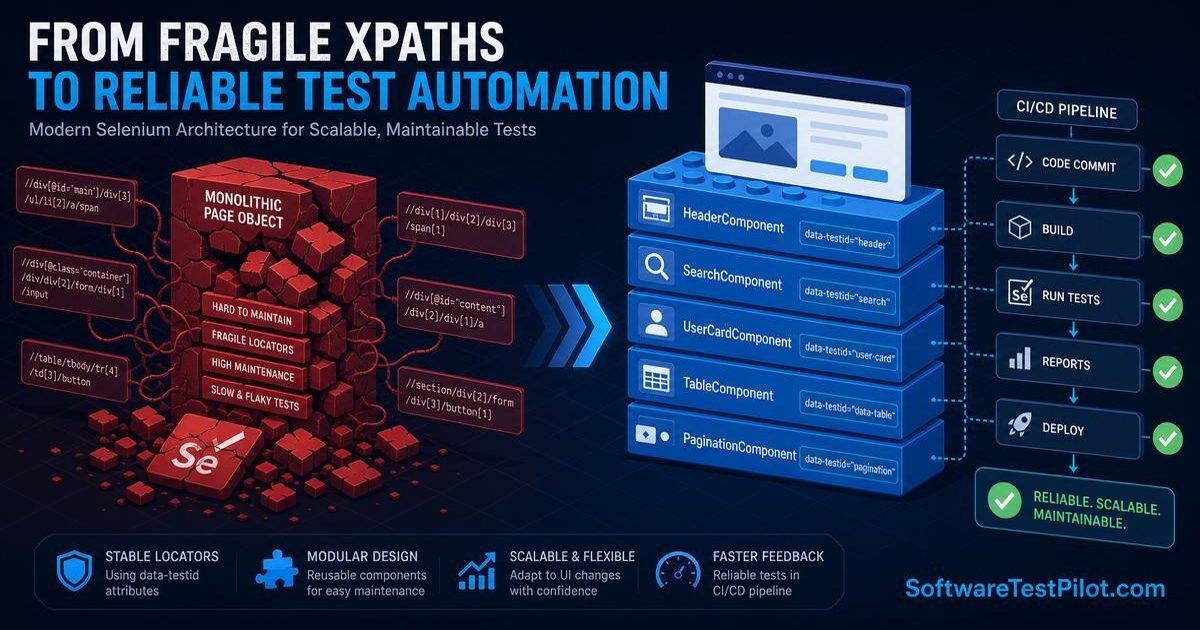
The uncomfortable truth: 90% of Selenium suites fail in CI/CD not because of WebDriver bugs, but because engineers still build them with 2010 design patterns. Monolithic Page Objects, chained XPath locators, implicit/explicit wait collisions, and shared state crumble under the concurrency and resource limits of modern cloud runners. Here is the architectural breakdown — and the 2026 Component-Based Atomic Architecture that fixes it.
SoftwareTestPilot tip: Pair this fix with our Selenium WebDriver guide, Playwright tutorial, and GitHub Actions CI guide. Practice explaining these patterns in the AI Mock Interview and benchmark SDET openings on the QA Jobs Radar.
1. The anatomy of a flaky Selenium test
When a test passes locally but fails intermittently in a container, it is almost never random. Three architectural mismatches cause it:
+------------------------------------------------------------------+
| 1. DOM RE-RENDERING RACE CONDITIONS                              |
|   React/Next/Vue hydrate elements dynamically -> StaleElement.   |
+------------------------------------------------------------------+
| 2. RESOURCE STARVATION IN HEADLESS CI CONTAINERS                 |
|   M3 MacBook: 12 CPU / 36GB RAM  vs  CI: 2 vCPU / 4GB RAM.       |
+------------------------------------------------------------------+
| 3. IMPLICIT + EXPLICIT WAIT COLLISIONS                           |
|   Mixing driver implicit waits with WebDriverWait polls          |
|   creates unpredictable timing loops under memory pressure.      |
+------------------------------------------------------------------+
Vector 1 — Async hydration & StaleElementReferenceException
Selenium stores a reference to the exact DOM node ID after findElement(). When React re-renders that node two milliseconds later — from a background state update, WebSocket event, or GraphQL cache invalidation — the old node ID is gone. The next .click() throws StaleElementReferenceException.
Vector 2 — Cloud runner hardware starvation
On your laptop, CSS animations render in 50 ms and JS queues empty instantly. On a 2-vCPU GitHub Actions runner, that same animation takes 500 ms and your hardcoded Thread.sleep(200) loses the race. Hardware assumptions baked into scripts always break in CI.
Vector 3 — Wait collisions
Setting driver.manage().timeouts().implicitlyWait(10s) AND using WebDriverWait stacks two polling loops on top of each other. Under memory pressure the browser thread starves and both loops time out at unpredictable moments.
2. The monolithic Page Object Model anti-pattern
The Page Object Model was revolutionary in 2010. In 2026, a single CheckoutPage class swelling to 1,500 lines of fragile locators is a maintenance liability. Here is what the anti-pattern looks like in production code today:
// Anti-Pattern: Monolithic, Fragile Page Object Model
public class LegacyCheckoutPageObject {
    private WebDriver driver;
    private WebDriverWait wait;

    // Fragile absolute XPaths that break on any layout shift
    private By billingAddressField = By.xpath("//div[@class='checkout-step'][2]//input[1]");
    private By stateDropdown = By.xpath("//form[@id='billing-form']/div[4]/select");
    private By submitButton = By.xpath("//button[contains(text(),'Place Order')]");
    private By loadingSpinner = By.id("ajax-loader");

    public LegacyCheckoutPageObject(WebDriver driver) {
        this.driver = driver;
        this.wait = new WebDriverWait(driver, Duration.ofSeconds(15));
    }

    public void enterBillingDetailsAndSubmit(String street, String state) throws InterruptedException {
        Thread.sleep(2000); // Anti-Pattern: arbitrary hardcoded sleep
        driver.findElement(billingAddressField).sendKeys(street);
        driver.findElement(stateDropdown).click();
        driver.findElement(By.xpath("//option[text()='" + state + "']")).click();
        driver.findElement(submitButton).click();
        wait.until(ExpectedConditions.invisibilityOfElementLocated(loadingSpinner));
    }
}
Why it fails in CI:
- Chained XPath vulnerability —
//div[@class='checkout-step'][2]//input[1]depends on exact DOM order. Add an info banner and the test breaks even though the feature works for users. - Hidden timing coupling —
Thread.sleep(2000)wastes 16 minutes across a 500-test suite in fast environments and is not long enough in slow ones. - Zero reusability — the same address-autocomplete modal on Checkout and Profile gets duplicated in two classes, doubling maintenance debt.
3. The 2026 Component-Based Atomic Architecture
High-performing QA teams have abandoned monolithic POMs for atomic components — isolated, reusable widget classes with their own scoping and wait strategies, borrowed straight from modern frontend engineering.
Principle 1 — Enforce data-testid contracts
Never locate by CSS class, visible text, or DOM hierarchy. Class names change during Tailwind refactors; text changes during i18n. Collaborate with frontend engineers in PR reviews to enforce data-testid or data-cy attributes on every interactive element.
Principle 2 — Isolate atomic UI components
Refactor the fragile Java suite into TypeScript atomic components:
// Good: Component-Based Atomic Automation Architecture
import { Page, Locator, expect } from '@playwright/test';

/**
 * Address Autocomplete widget — reusable across Checkout, Profile, Registration.
 */
export class AddressWidgetComponent {
  readonly rootLocator: Locator;
  readonly streetInput: Locator;
  readonly stateDropdown: Locator;
  readonly suggestionsList: Locator;

  constructor(page: Page, rootSelector = '[data-testid="address-widget-container"]') {
    this.rootLocator = page.locator(rootSelector);
    this.streetInput = this.rootLocator.locator('[data-testid="street-address-input"]');
    this.stateDropdown = this.rootLocator.locator('[data-testid="state-select-dropdown"]');
    this.suggestionsList = this.rootLocator.locator('[data-testid="address-suggestions-box"]');
  }

  async selectAddressDeterministic(street: string, stateCode: string): Promise<void> {
    await this.streetInput.fill(street);
    // Deterministic wait anchored to actionable UI state, not a static sleep
    await expect(this.suggestionsList).toBeVisible({ timeout: 10000 });
    await this.stateDropdown.selectOption({ value: stateCode });
  }
}

/**
 * Atomic Checkout page composing reusable widgets.
 */
export class AtomicCheckoutPage {
  readonly page: Page;
  readonly addressWidget: AddressWidgetComponent;
  readonly submitButton: Locator;

  constructor(page: Page) {
    this.page = page;
    this.addressWidget = new AddressWidgetComponent(page);
    this.submitButton = page.locator('[data-testid="place-order-button"]');
  }

  async submitOrderWithVerification(): Promise<void> {
    // Intercept the backend response so verification is deterministic
    const orderPromise = this.page.waitForResponse(r =>
      r.url().includes('/v1/orders') && r.status() === 201
    );
    await this.submitButton.click();
    const response = await orderPromise;
    expect(response.ok()).toBeTruthy();
  }
}
Why this survives CI: selectors are bound to the input node, not DOM structure, so wrapping the input in three new layout divs doesn't break anything. Locators auto-wait for actionable state, eliminating StaleElementReferenceException. And anchoring assertions to real HTTP responses removes animation guessing entirely. Reinforce this pattern with our Playwright + POM in TypeScript and Playwright locators guide.
4. The true financial cost of flaky tests
To get leadership to fund a refactor, translate flakiness into cash:
ENGINEERING PARAMETERS
  Total developers & SDETs           50 engineers
  Fully-loaded comp                  $160,000 / yr ($80/hr)
  PRs merged per engineer per day    2  -> 100 PR builds/day
  Suite flakiness rate               15% -> 15 flaky builds/day

DAILY TIME LOSS
  Triage + rerun per flaky build     25 minutes
  Engineering hours wasted per day   15 * 25 min = 6.25 hrs

ANNUAL FINANCIAL DRAIN
  6.25 hrs * $80/hr = $500/day
  $500/day * 240 days = $120,000 wasted per year
The $120k is only direct salary. Add delayed time-to-market, cloud compute bloat from re-runs, and burnout among QA engineers babysitting the pipeline, and the real number is 2–3x higher.
5. Step-by-step refactoring strategy
Do not rewrite 500 tests overnight. Roll out the fix in four phases:
PHASE 1  WEEKS 1-2  QUARANTINE & TRIAGE
  Tag the top 20% flakiest scripts and move them to a non-blocking
  diagnostic pipeline. Immediately restores PR-blocking stability.

PHASE 2  WEEKS 3-4  LOCATOR CONTRACT ENFORCEMENT
  Lint scripts for absolute XPaths. Add ESLint/Sonar rules that block
  new PRs missing data-testid attributes on interactive elements.

PHASE 3  WEEKS 5-6  ELIMINATE STATIC SLEEPS
  Global regex for Thread.sleep() / cy.wait(Number). Replace with
  condition polling and network interception.

PHASE 4  WEEKS 7-8  SHARDED PARALLELIZATION
  Containerize tests and shard across 5-10 GitHub Actions workers
  to drive PR feedback under 8 minutes.
Pair this rollout with our Docker for Selenium Grid guide and the CI/CD pipeline testing tutorial. Interviewing? Rehearse the architectural narrative in the AI Mock Interview and refresh your resume in the Resume ATS Review.
6. Conclusion & 24-hour action step
Selenium WebDriver is still an excellent protocol. Writing 2010-era Page Objects on top of 2026 cloud pipelines is what breaks. Enforce data-testid contracts, delete every static sleep, and synchronize UI actions with backend API responses.
Do this today: run rg "Thread.sleep|cy.wait\\(\\d" across your repo. Take the single flakiest script, strip the XPath and sleeps, and refactor it into an atomic component. Watch its next five CI runs go green.
Related reading: Selenium WebDriver guide, Playwright vs Selenium, Playwright installation guide, Selenium interview questions. External reference: Selenium official waits documentation.