
Smoke vs Sanity vs Regression Testing — Differences, CI/CD Flow & Examples
Smoke, sanity and regression testing sound similar but solve very different problems in a modern CI/CD pipeline. This guide gives you the definitive comparison table, a real CI/CD flow diagram, code-level examples, and the exact interview answers hiring managers expect in 2026.
- Side-by-side comparison table — optimised for featured snippets
- CI/CD pipeline flow diagram showing where each test type runs
- Real Playwright/JUnit test tagging examples (@smoke, @sanity, @regression)
- When to skip, when to gate, when to shard
- 10 interview-ready Q&A + JSON-LD FAQ schema
1. Quick answer (featured-snippet)
Smoke testing is a broad, shallow check that verifies a new build is stable enough to test. Sanity testing is a narrow, focused check that verifies a specific change or bug fix works as intended. Regression testing re-runs the wider test suite to confirm the change did not break existing functionality.
In a CI/CD pipeline they run in that order: Smoke → Sanity → Regression → Deploy. Smoke gates the build, sanity scopes the regression, and regression gates the release.
2. Comparison table (Smoke vs Sanity vs Regression)
Use this table as your featured-snippet reference and interview cheat-sheet:
| Aspect | Smoke | Sanity | Regression |
|---|---|---|---|
| Goal | Verify the build is stable enough to test | Verify a specific change or bug fix works | Verify existing features still work after any change |
| Scope | Broad, shallow (critical paths only) | Narrow, deep (one changed area) | Broad, deep (entire application) |
| When it runs | After every new build (pre-test gate) | After a hotfix or minor build | Before every release; nightly in CI |
| Duration | < 5 minutes | 15–30 minutes | 1–8 hours (sharded) |
| Documented? | Fully scripted & automated | Often unscripted / ad-hoc | Fully scripted, tagged @regression |
| Automated? | Almost always | Sometimes | Almost always |
| Owner | QA + DevOps | QA engineer on the change | QA team / SDET |
| Blocks pipeline? | Yes — hard gate | Optional — decides regression scope | Yes — pre-prod gate |
| Example question | Can a user log in and reach the dashboard? | Does the new EU tax rule apply correctly? | Do all 800 checkout flows still pass? |
Related: 25+ types of software testing · Software Testing Life Cycle (STLC).
3. Where each runs — CI/CD pipeline flow diagram
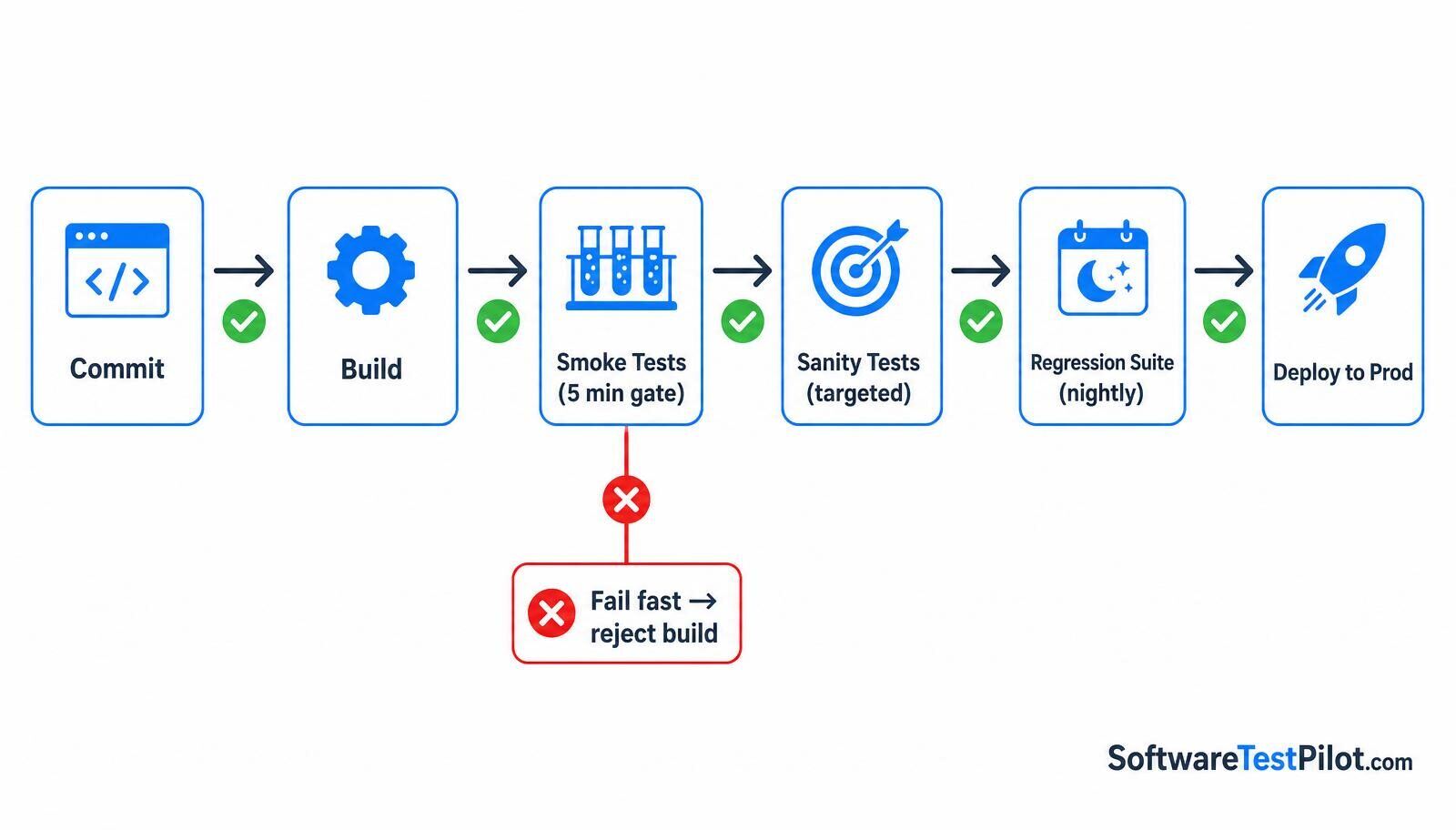
- Commit → Build. Developer pushes; CI builds and produces a deployable artefact.
- Smoke stage (under 5 min). 20–50 critical-path tests tagged
@smoke. If any fail, the pipeline stops and the build is rejected — this is the fail-fast gate. - Sanity stage. Runs a subset of tests scoped to the changed module (e.g. only checkout tests when the pricing service changes). Decides whether the full regression is worth the compute cost.
- Regression stage. Full suite tagged
@regression, usually sharded across parallel runners. Nightly for main, and always before a production deploy. - Deploy. Green pipeline → canary → 100% rollout. Post-deploy synthetic smoke tests monitor production.
4. Real code — tagging tests for each stage
In practice, teams use tags/annotations to filter which subset runs at which stage. Example with Playwright + TypeScript:
test('user can log in @smoke @regression', async ({ page }) => {
await page.goto('/login');
await page.fill('#email', 'qa@example.com');
await page.fill('#password', 'secret');
await page.click('button[type="submit"]');
await expect(page).toHaveURL('/dashboard');
});
test('EU tax applies to Ireland orders @sanity', async ({ request }) => {
const res = await request.post('/api/cart/tax', { data: { country: 'IE', total: 100 } });
expect((await res.json()).tax).toBe(23);
});
Then in GitHub Actions:
- name: Smoke gate
run: npx playwright test --grep @smoke
- name: Sanity (only if smoke passes)
run: npx playwright test --grep @sanity
- name: Nightly regression
if: github.event_name == 'schedule'
run: npx playwright test --grep @regression --shard=${{ matrix.shard }}/4
Prefer JUnit or TestNG? The same pattern applies via @Tag("smoke") and mvn test -Dgroups=smoke. See our Playwright and Selenium Q&A hubs for framework-level detail.
5. Real-world scenarios — which one do you run?
- A new build arrives from dev. → Smoke. Verify build stability before spending compute on deeper suites.
- A hotfix patches a tax-calculation bug. → Sanity on the tax module, then a targeted regression on checkout.
- A framework upgrade (React 19 → 20). → Full regression, sharded, plus visual regression.
- A config-only feature flag toggle. → Smoke only; skip regression.
- Pre-production release. → Regression is the mandatory gate. No green regression, no deploy.
6. Common mistakes to avoid
- Bloating the smoke suite. Once smoke exceeds ~5 minutes, developers stop trusting the gate and start bypassing it.
- Skipping regression on urgent hotfixes. The one-line fix that broke everything is a weekly incident in teams that do this.
- Not tagging tests. Without
@smoke/@sanity/@regressiontags you cannot filter suites — every stage runs everything. - Confusing sanity with smoke in stand-ups. They are different — clarify in your interview answers using the table above.
7. Interview-ready summary
In a QA or SDET interview, the golden answer is: “Smoke is build-acceptance, sanity is change-acceptance, regression is release-acceptance.” Then reference the CI/CD flow — Smoke gates the build, sanity scopes what to re-run, regression gates the deploy.
Practice this live in the AI Mock Interview, and drill 300+ related questions in the Software Testing Interview Q&A hub. Landing an SDET role? Update your CV with the ATS Resume Review and browse live openings in the QA Jobs Radar.