
Types of Software Testing — Functional vs Non-Functional (25+ Types Explained, 2026)
The complete 2026 guide to types of software testing. A mega visual tree of 25+ testing types split into functional vs non-functional, with icons, real-world examples, tool mapping, when to run each in CI/CD, and a downloadable comparison table.

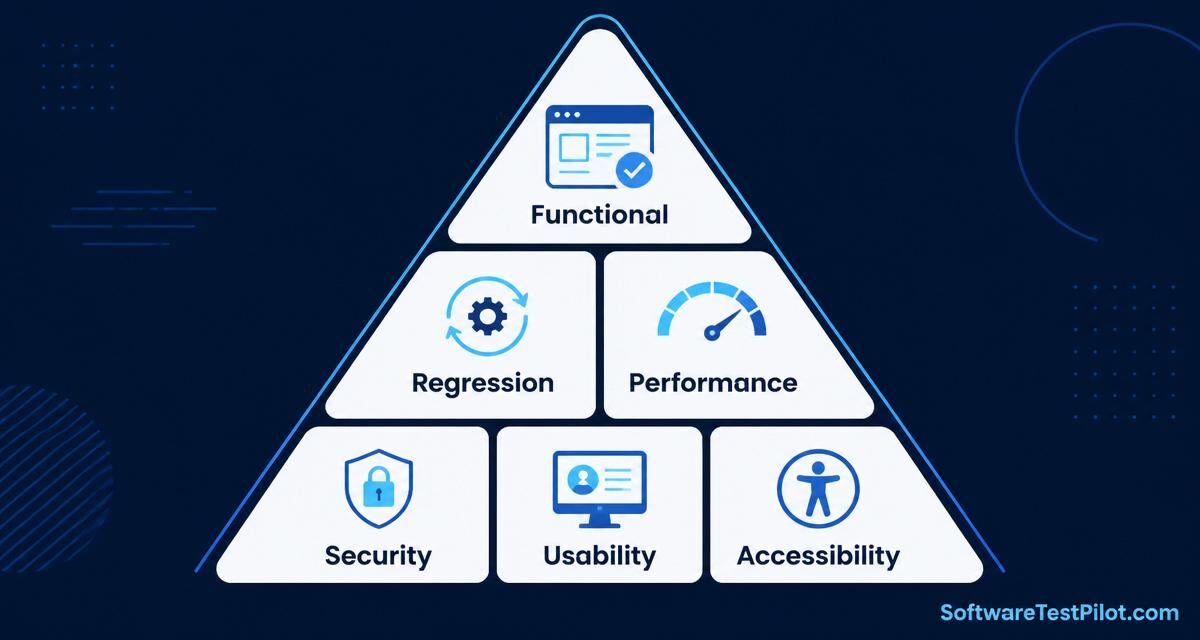
Types of software testing at a glance
Ask ten QA engineers to list the types of software testing and you'll get ten different lists. The reason is that testing can be sliced along at least four axes at the same time: who looks at the code (white / grey / black box), what level of the system is exercised (unit → integration → system → acceptance), what quality attribute is being verified (functional vs non-functional) and when in the release cycle the test runs (smoke on every PR, endurance every quarter). This 2026 guide untangles all of that with one canonical tree, 25+ testing types explained with real examples, icon-based cheat cards and a tool mapping you can copy into your test plan today.
New to QA? Start with What Is Software Testing? The Complete 2026 Guide first, then come back here. If you are prepping interviews, jump to the freshers, 3-year or senior question banks after finishing this article.
The mega tree: functional vs non-functional (25+ types)
Below is the single diagram every QA engineer should be able to draw from memory. Save it, print it, pin it above your monitor.
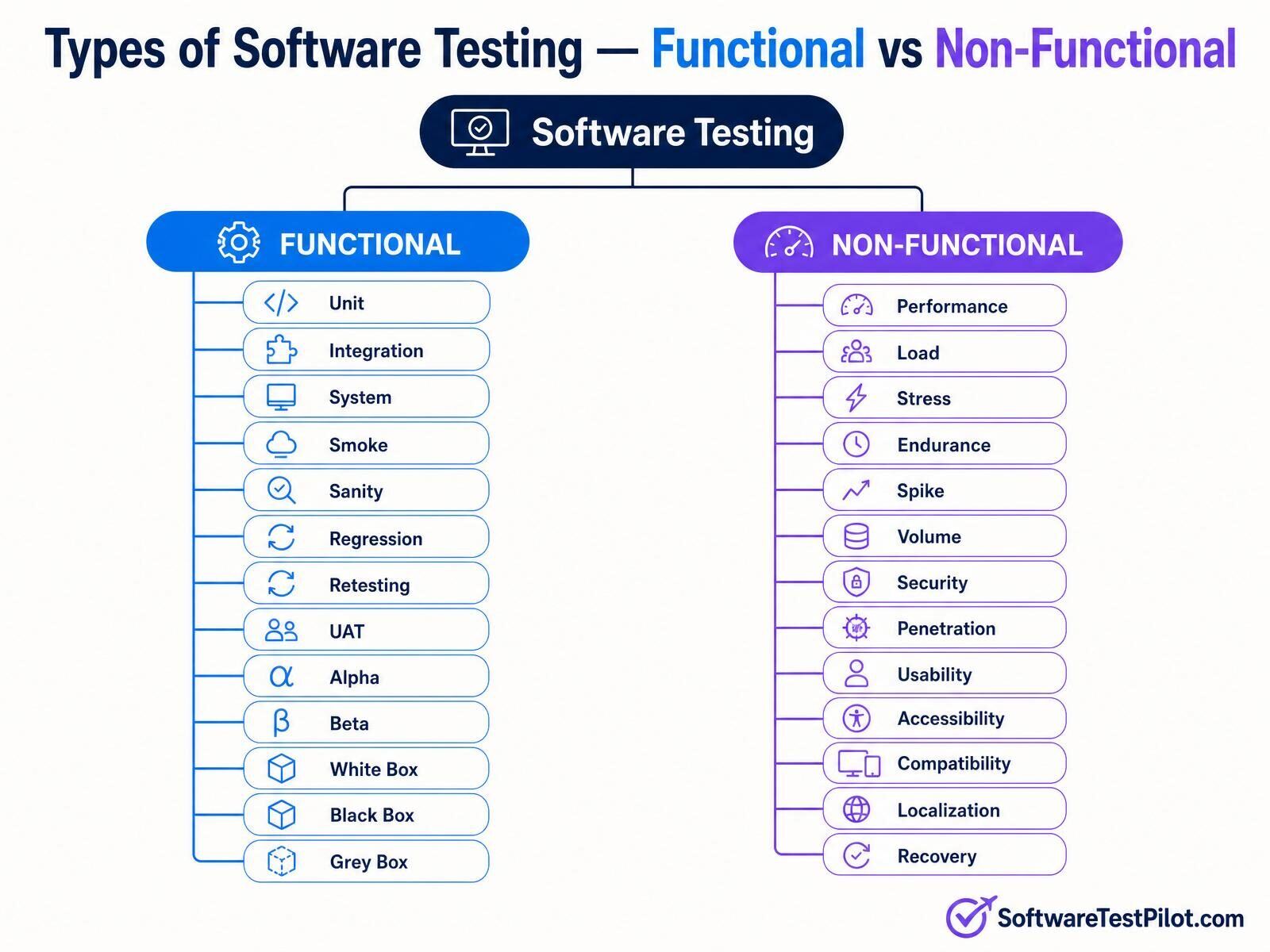
The split is deliberately binary because the ISO/IEC 25010 quality model itself splits software quality into functional suitability (does it do the right thing?) and eight non-functional characteristics (does it do it well?). Every test you write ultimately lands on one side of this tree.
Two-line summary of every major type
| # | Type | Family | What it verifies (one line) |
|---|---|---|---|
| 1 | Unit | Functional | A single function, class or component behaves as coded. |
| 2 | Integration | Functional | Two or more modules talk to each other correctly. |
| 3 | System | Functional | The fully assembled product meets requirements end-to-end. |
| 4 | Smoke | Functional | The build is stable enough to justify deeper testing. |
| 5 | Sanity | Functional | A targeted narrow check that a specific fix works. |
| 6 | Regression | Functional | Old features still work after new code lands. |
| 7 | Retesting | Functional | A previously failing case now passes on the fixed build. |
| 8 | UAT | Functional | Real business users accept the software for production. |
| 9 | Alpha | Functional | Internal end-to-end validation before external release. |
| 10 | Beta | Functional | Selected external users validate in real environments. |
| 11 | White box | Functional | Tests written with full knowledge of internal code paths. |
| 12 | Black box | Functional | Tests written purely against the spec, with no code access. |
| 13 | Grey box | Functional | Partial code knowledge — DB schema, APIs, but not source. |
| 14 | Performance | Non-functional | Response time, throughput and resource use under expected load. |
| 15 | Load | Non-functional | Behaviour at or just above expected concurrent user counts. |
| 16 | Stress | Non-functional | Behaviour beyond capacity — how gracefully does it fail? |
| 17 | Endurance | Non-functional | Stability over long runs (memory leaks, connection leaks). |
| 18 | Spike | Non-functional | Sudden bursts of load (flash sales, viral moments). |
| 19 | Volume | Non-functional | Behaviour with very large data sets in DB or files. |
| 20 | Security | Non-functional | Confidentiality, integrity and availability against attackers. |
| 21 | Penetration | Non-functional | Simulated real attacks to find exploitable weaknesses. |
| 22 | Usability | Non-functional | Ease-of-use, learnability and user satisfaction. |
| 23 | Accessibility | Non-functional | Conformance to WCAG 2.2 for users with disabilities. |
| 24 | Compatibility | Non-functional | Works across browsers, OSes, devices and screen sizes. |
| 25 | Localization / i18n | Non-functional | Language, currency, date and RTL layout correctness per locale. |
| 26 | Recovery | Non-functional | System restores state cleanly after a crash, kill or network drop. |
Functional testing types — the 13 you must know
Functional testing verifies what the software does. Every case has a clear pass/fail outcome tied to a requirement. Automate everything you can; leave exploratory sweeps for humans.
1. Unit testing
Written by developers, executed on every commit. One test, one behaviour. Frameworks: JUnit, TestNG, pytest, Jest, Vitest. Target: 70% of your test pyramid. Fast feedback (<10 min for the whole suite) is non-negotiable — see the test pyramid explained.
2. Integration testing
Checks the seams. Two flavours: big-bang (integrate everything, test) — cheap but debugging is nightmare — and incremental (top-down or bottom-up), which is what modern teams do. Use test containers, mock external HTTP with WireMock or MSW.
3. System testing
The fully assembled product is validated end-to-end against the SRS. All interfaces, all workflows, all environments — usually in a staging environment that mirrors production. This is where Playwright and Selenium shine (see Playwright vs Selenium).
4. Smoke testing
Also called "build verification". A 5-minute pass over the app's most critical happy paths (login, home, checkout). If smoke fails, the build is rejected before deeper suites run — saving hours of wasted execution.
5. Sanity testing
Narrow and deep. When dev says "I fixed the coupon-code bug", sanity testing verifies just that fix and nearby logic — before you launch the full regression pack.
6. Regression testing
The safety net. Every automated case ever written is re-run against every new build. In 2026, teams keep regression suites under 30 minutes with parallel execution — anything longer and developers stop waiting. AI-assisted flake detection (self-healing Selenium) is now mainstream.
7. Retesting (confirmation testing)
The single failing case is executed again on the fixed build. If it passes, close the bug. Do not confuse with regression, which re-checks unrelated features for side-effects.
8. User Acceptance Testing (UAT)
Executed by real business users (or their proxies — product managers, domain experts) against acceptance criteria. UAT signs off the release. If UAT fails, the feature does not ship, no matter how green the automation is.
9. Alpha testing
Internal, end-to-end pre-release testing done at the developer's site by employees who did not build the feature. Bugs found here rarely reach customers.
10. Beta testing
Selected external users run the pre-release build in their own environments. Feedback drives the final go/no-go decision. Slack, WhatsApp and every major SaaS product ship beta channels.
11. White box testing
Also called "clear box" or "glass box". Testers know the source code and design tests to hit specific branches, loops and paths. Statement, branch and path coverage metrics come from here. Typically the developer's job.
12. Black box testing
Testers see only inputs and outputs — no source. Techniques: equivalence partitioning, boundary value analysis, decision tables, state transition. This is the daily bread of manual and functional QA.
13. Grey box testing
Best of both worlds. Testers know the DB schema, API contract or config but not the internal source. Most modern API and integration testing is grey box.
Non-functional testing types — the 13 that break in production
Non-functional testing verifies how well the software does what it does. These are the tests that catch the bugs that make the news — outages, data breaches, WCAG lawsuits.
14. Performance testing
Umbrella term for load, stress, spike, endurance and volume. Answers "does it feel fast?" with numbers — p50/p95/p99 latency, throughput, error rate, CPU, memory. See the JMeter beginners tutorial and k6 vs JMeter.
15. Load testing
Sustained expected load (say 1,000 concurrent users). Verifies the system meets its SLA under normal peak conditions. Run before every major release, weekly on trunk.
16. Stress testing
Push load beyond capacity until the system breaks. You are not looking for pass — you are looking for graceful degradation: rate limits, circuit breakers, queued requests, no data loss. If it crashes and corrupts, you have a bug.
17. Endurance / soak testing
Run production-like load for 8, 24 or 72 hours. Finds memory leaks, DB connection leaks, log file bloat and event-loop stalls that only appear after millions of requests.
18. Spike testing
Instant 10× traffic (flash sale, TV ad, viral tweet). Verifies autoscaling, cold-start behaviour and cache warm-up. Modern k6 has first-class spike stages.
19. Volume testing
Load large data volumes into the DB / files / caches and measure. A report that renders in 200ms on 10k rows may take 40s on 10M rows. Volume tests catch it before customers do.
20. Security testing
Verifies confidentiality, integrity and availability. Covers auth, authz, session, input validation, crypto, secure headers. Start with the OWASP Top 10 and see our security testing for QA primer.
21. Penetration testing
Ethical hackers simulate real attacks. Usually outsourced to specialised firms once per major release. Deliverable is a report with CVE-style findings, severity and remediation.
22. Usability testing
Real users complete real tasks while you observe. Measures task success rate, time on task, error rate, SUS score. Five users find 85% of usability issues (Nielsen's rule).
23. Accessibility testing
Conformance to WCAG 2.2 AA. Automate 40% with axe-core / Lighthouse, do the other 60% manually with screen readers (NVDA, VoiceOver) and keyboard-only navigation. See our accessibility (WCAG) guide.
24. Compatibility testing
Cross-browser, cross-OS, cross-device, cross-resolution. Tools: BrowserStack, Sauce Labs, Playwright device presets. In 2026, minimum matrix = Chrome / Safari / Firefox × Windows / macOS / iOS / Android.
25. Localization & internationalization (L10n / i18n)
Verify that strings, dates, numbers, currencies and RTL layouts render correctly per locale. Pseudo-localization catches hard-coded English before translators start work.
26. Recovery testing
Kill -9 the app mid-transaction, drop the DB connection, unplug the network. The system must recover to a consistent state — no orphan rows, no lost messages, no double charges.
Functional vs non-functional — side by side
| Dimension | Functional testing | Non-functional testing |
|---|---|---|
| What it verifies | Correct behaviour vs requirements | Quality attributes (speed, safety, UX) |
| Answers | "Does it work?" | "How well does it work?" |
| Basis | User stories, use cases, SRS | SLAs, NFRs, ISO/IEC 25010, WCAG |
| Result | Pass / fail (binary) | Measurement vs threshold (numeric) |
| When executed | Every PR / build | Nightly / weekly / pre-release |
| Typical tools | Playwright, Selenium, JUnit, Postman | k6, JMeter, OWASP ZAP, axe-core, Lighthouse |
| Owned by | Devs + QA | QA + SRE + Security |
When to run each type — a CI/CD placement guide
The single biggest mistake teams make is running the wrong tests at the wrong stage. Use this as your default pipeline template:
- Pre-commit (local): unit + linting.
- Pull request (2–10 min): unit + integration + smoke + accessibility (axe) + WCAG contrast.
- Merge to main (10–30 min): full regression + API contract tests + security static analysis (SAST).
- Nightly (1–4 h): cross-browser compatibility + load test at 1× SLA + volume test.
- Weekly: stress + spike + endurance + dynamic security scan (DAST / OWASP ZAP).
- Pre-release: UAT + penetration test + recovery drill (chaos engineering).
- Post-release: synthetic monitoring + real-user monitoring (RUM) + A/B usability.
For a concrete implementation, see CI/CD pipeline testing tutorial and GitHub Actions for Selenium CI.
Tool cheat-sheet by testing type
| Type | Free / OSS | Commercial / Cloud |
|---|---|---|
| Unit | JUnit, pytest, Jest, Vitest, xUnit | — |
| Integration / API | Postman, REST Assured, Playwright, WireMock | Katalon, ReadyAPI |
| System / E2E | Playwright, Selenium, Cypress | BrowserStack, Sauce Labs, LambdaTest |
| Performance | k6, JMeter, Locust, Gatling | BlazeMeter, LoadRunner, k6 Cloud |
| Security | OWASP ZAP, Burp Suite Community, Semgrep | Burp Suite Pro, Veracode, Checkmarx |
| Accessibility | axe-core, Lighthouse, WAVE, NVDA | Deque axe DevTools Pro, Level Access |
| Compatibility | Playwright device presets | BrowserStack, Sauce Labs |
| Mobile | Appium, Espresso, XCUITest | Perfecto, Kobiton |
| AI-assisted | GitHub Copilot Free tier | Mabl, Testim, Applitools, Functionize |
Deep dives: Playwright, Appium, k6, GitHub Copilot for QA.
How to choose the right testing types for your project
Not every project needs all 26 types. Use this risk-based scoring:
- All projects (mandatory): unit, integration, smoke, regression, retesting, accessibility, security basics, compatibility.
- Public-facing consumer apps: add performance, load, usability, localization.
- Financial / healthcare / regulated: add penetration, volume, recovery, endurance, formal UAT.
- High-traffic e-commerce: add spike + stress every sprint, chaos engineering monthly.
- B2B SaaS: add API contract testing (Pact), tenant isolation security tests.
Turn this into an entry in your test strategy document and revisit it every quarter.
How this shows up in interviews
"What are the different types of software testing?" is the single most common opening question in QA interviews at every level. A good answer:
- Draws the functional vs non-functional split (the mega tree above).
- Names 4–5 examples from each side with one-line definitions.
- Gives the interviewer when you would run each in a CI pipeline.
- Adds a modern angle — AI-assisted test generation, self-healing, shift-left security.
Practice the full answer with our AI Mock Interview, then move to level-specific banks: freshers, 3 years' experience, senior. Related deep-dives: Selenium, Playwright, API testing, SQL.
Keep learning
- What Is Software Testing? — the pillar guide
- Test pyramid explained
- How to write test cases for a login page
- JMeter tutorial for beginners
- Security testing for QA
- Accessibility (WCAG 2.2) guide
- Get your QA resume ATS-scored
- Find remote QA jobs — Jobs Radar
- ISTQB Glossary (official)
- ISO/IEC 25010 quality model (official)