
Software Testing Life Cycle (STLC) — 6 Phases with Entry & Exit Criteria (2026 Guide)
The complete 2026 guide to the Software Testing Life Cycle (STLC): 6 phases explained with a full entry/exit criteria table, deliverables, activities, real-world example and STLC vs SDLC comparison. Written for QA freshers and working testers.

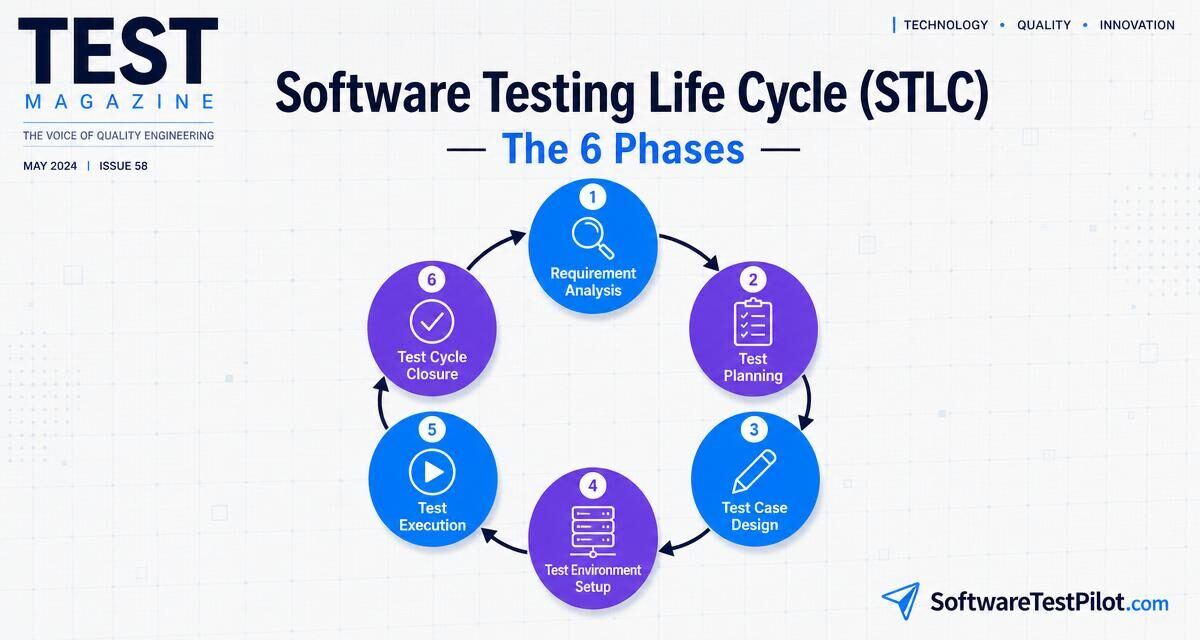
What is the Software Testing Life Cycle (STLC)?
The Software Testing Life Cycle (STLC) is a defined sequence of six phases that QA teams follow to plan, design, execute and close testing on a release. Each phase has clear entry criteria (what must be ready before it starts), activities (what the team does), deliverables (what it produces) and exit criteria (what must be true before moving on).
STLC runs alongside the SDLC, but it is not a subset of development — it is its own discipline. The six phases are: 1 Requirement Analysis → 2 Test Planning → 3 Test Case Design → 4 Test Environment Setup → 5 Test Execution → 6 Test Cycle Closure. This guide walks through each phase with a full entry/exit criteria table, a real-world example, STLC vs SDLC comparison and the interview answers you need for freshers, 3-year and senior rounds.
The 6 phases of STLC at a glance
STLC is iterative, not linear. In agile teams the whole cycle repeats every sprint (2 weeks). In waterfall or regulated releases it may run once per quarter. Either way, the six phases and their gates stay the same.
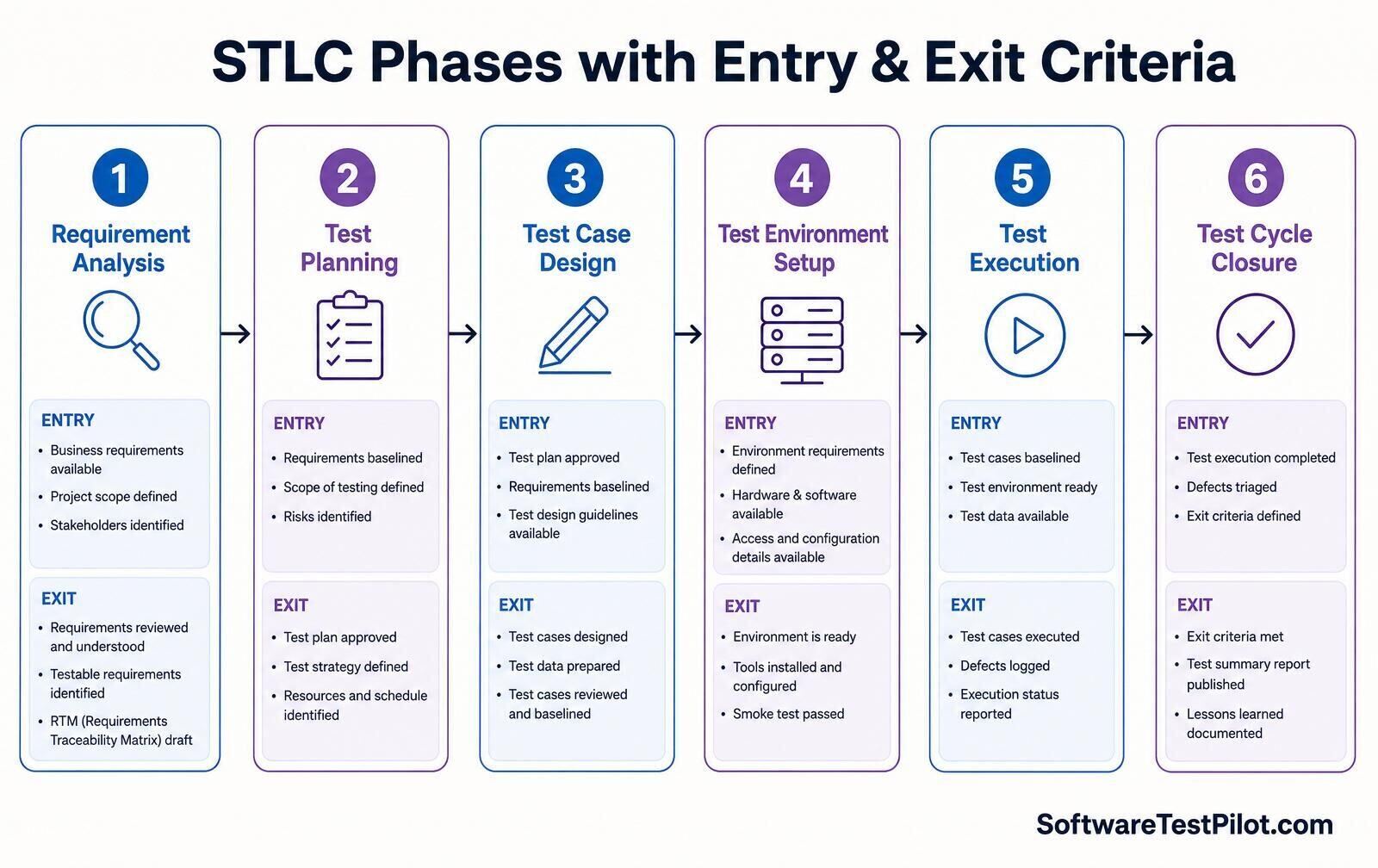
STLC entry & exit criteria table (featured snippet)
The single table every QA engineer should be able to reproduce in an interview — activities, deliverables and the exact gates between phases:
| # | Phase | Entry criteria | Key activities | Deliverables | Exit criteria |
|---|---|---|---|---|---|
| 1 | Requirement Analysis | Business requirements available; project scope defined; stakeholders identified | Study requirements; identify testable requirements; list automation candidates; clarify with BA/dev | RTM (Requirements Traceability Matrix) draft; list of questions | Requirements reviewed & understood; testable requirements identified; RTM baselined |
| 2 | Test Planning | Requirements baselined; scope of testing defined; risks identified | Define scope, approach, tools, environments; estimate effort; identify risks; build schedule | Test Plan document; test strategy; effort estimation; risk log | Test plan approved; test strategy defined; resources and schedule confirmed |
| 3 | Test Case Design | Test plan approved; requirements baselined; test design guidelines available | Write test cases & scenarios; create test data; peer review; update RTM | Test cases; test scripts; test data sets; RTM v2 | Test cases designed & reviewed; test data prepared; cases baselined |
| 4 | Test Environment Setup | Environment requirements defined; hardware/software available; access and configuration details ready | Provision servers, DBs, test data; install tools; configure integrations; run smoke on the env | Environment ready-for-test report; smoke results; test data loaded | Environment is ready; tools installed and configured; environment smoke passed |
| 5 | Test Execution | Test cases baselined; test environment ready; test data available; build deployed | Execute test cases; log defects; retest fixes; run regression; report status | Test execution report; defect log; RTM v3 (with status) | All planned test cases executed; defects logged, triaged and re-tested; execution status reported |
| 6 | Test Cycle Closure | Test execution completed; defects triaged; exit criteria defined | Verify exit criteria; hold closure meeting; capture lessons learned; publish test summary report | Test summary report; test metrics; lessons learned; archived artefacts | Exit criteria met; test summary report published; lessons learned documented |
Phase 1 — Requirement Analysis
The QA team studies the requirements (business, functional and non-functional) as soon as they are baselined by the BA. The goal is not to test yet — it is to understand what to test and question what cannot be tested.
Activities
- Read the SRS / user stories / acceptance criteria line by line.
- Identify testable vs non-testable requirements (a requirement is testable only if you can write a pass/fail check for it).
- Flag ambiguities, contradictions and missing NFRs (performance targets, security expectations, WCAG level).
- Draft the Requirements Traceability Matrix (RTM) — every requirement mapped to one or more test cases.
- List candidate features for automation (see types of software testing to decide which type covers which requirement).
Deliverables
- Draft RTM
- List of clarification questions for BA/dev
- Automation feasibility notes
Real example: for a “login with Google OAuth” story, testable items include success, cancelled consent, revoked token, blocked account, and session persistence — all of which land as rows in the RTM before a single test case is written.
Phase 2 — Test Planning
The test lead owns this phase. The output is the Test Plan — the single document that binds scope, approach, resources and schedule together.
Activities
- Define in-scope and out-of-scope features (out-of-scope is often more valuable than in-scope).
- Choose test levels (unit, integration, system, UAT) and test types (smoke, regression, performance, security, accessibility).
- Pick tools (Playwright, Selenium, Postman, k6, axe-core — see the tool matrix in types of software testing).
- Estimate effort and resource allocation; produce a Gantt or sprint plan.
- Identify risks and mitigation (e.g. “third-party API sandbox may be flaky — plan mock server”).
- Define entry and exit criteria for each phase and for the release itself.
Deliverables
- Test Plan (IEEE 829 or lightweight equivalent)
- Test Strategy
- Effort estimation
- Risk log
The IEEE 829 test plan template is a solid starting point — see the IEEE standards catalogue. Most modern teams use a trimmed version in Confluence or Notion.
Phase 3 — Test Case Design
Now the team writes the actual test cases and prepares test data. Every case is peer reviewed before baseline.
Activities
- Design test cases using techniques like Equivalence Partitioning, Boundary Value Analysis, Decision Tables and State Transition (covered in the what is software testing pillar).
- Prepare positive, negative and edge cases.
- Create test data — synthetic where possible, anonymised where needed. See test data management for automation.
- Write automation scripts for regression candidates.
- Peer review; update RTM so every requirement has ≥1 test case.
Deliverables
- Test cases (in TestRail, Zephyr, Xray or a spreadsheet)
- Automation scripts
- Test data sets
- Updated RTM (v2)
Tip for interviews: for a login page, teams typically write 40–60 test cases across UI, functional, validation, security, session, accessibility and performance — see our login page test cases guide.
Phase 4 — Test Environment Setup
Often run in parallel with Phase 3 by a DevOps or SRE partner. Nothing else in STLC works if the environment is wrong.
Activities
- Provision servers, DBs, message queues and caches to match production topology as closely as possible.
- Deploy the build under test.
- Load anonymised or synthetic test data (from Phase 3).
- Install and configure test tools (Playwright, k6, ZAP, axe).
- Wire integrations to external systems or mocks (WireMock, MSW, Mockoon).
- Run a smoke test on the environment itself before opening it to the wider QA team.
Deliverables
- Environment ready-for-test report
- Smoke results
- Access credentials matrix
In 2026 most teams provision test environments as code — Terraform + GitHub Actions or Argo. That makes tear-down / rebuild for every sprint a 5-minute pipeline instead of a two-day ticket.
Phase 5 — Test Execution
The most visible phase — where cases actually run against the build.
Activities
- Execute the test cases (manual + automated) in priority order — P0 smoke first, then P1 functional, then P2 regression, then non-functional.
- Log defects with clear repro steps, severity, priority, environment and evidence (screenshots, HAR, videos).
- Retest fixes and run regression around the fix area.
- Update RTM v3 with pass / fail / blocked status.
- Publish daily status reports — number of cases executed, pass rate, defects opened / closed, blockers.
Deliverables
- Test execution report
- Defect log
- Updated RTM (v3)
- Daily status emails / dashboards
A modern rule: if your automated regression pack takes longer than 30 minutes, split it and parallelise — developers stop waiting on suites longer than that (see CI/CD pipeline testing).
Phase 6 — Test Cycle Closure
The phase most teams skip — and pay for the next release. Closure is where you convert a completed test cycle into organisational learning.
Activities
- Verify all release exit criteria are met (usually: 100% P0/P1 test cases executed, 0 open Sev-1 defects, coverage > agreed threshold, non-functional targets met).
- Hold a closure meeting with dev, PM, QA, SRE.
- Capture lessons learned: what slowed us, what flaked, what to automate next.
- Publish the Test Summary Report — test cases executed, pass rate, defect density, defect leakage, time to fix.
- Archive artefacts (test cases, defects, environment configs) for audit and next release.
Deliverables
- Test Summary Report
- Test metrics dashboard
- Lessons-learned document
- Archived RTM (final)
STLC vs SDLC — how they line up
| Aspect | SDLC (Software Development Life Cycle) | STLC (Software Testing Life Cycle) |
|---|---|---|
| Focus | Building the product | Verifying the product |
| Owner | Development team | QA / test team |
| Phases | Requirements → Design → Coding → Testing → Deployment → Maintenance | Requirement Analysis → Planning → Design → Env Setup → Execution → Closure |
| Trigger | Business idea / user need | Baselined requirements |
| Key artefact | Working software | Test Plan + RTM + Test Summary Report |
| Relationship | Parent lifecycle | Runs in parallel with SDLC testing phase, but has its own gates |
STLC is not the testing phase of SDLC — it starts as soon as requirements are baselined, well before code is written. This is exactly what “shift-left testing” means in practice.
STLC in agile and DevOps — does it still apply?
Yes — with three modifications:
- The whole cycle compresses into a sprint. Requirement analysis happens at backlog refinement, planning at sprint planning, design and env setup during the first 2–3 days, execution across the sprint, closure at sprint review + retro.
- Automation moves earlier. Test cases and scripts are written alongside code (or before, in TDD/BDD — see BDD with Cucumber).
- Environments are ephemeral. Every PR gets a preview environment; the “Test Environment Setup” phase becomes a pipeline stage, not a project.
The six phases are still there — they just run continuously instead of once per release. Teams that skip a phase (usually closure) accumulate technical debt that surfaces as regression pain 3–4 sprints later.
Worked example — STLC for an e-commerce checkout feature
Concrete run-through of a 2-week sprint that adds “Buy Now Pay Later” to checkout:
- Day 1 (Requirement Analysis): QA reviews the 4 user stories, drafts RTM with 24 requirements, flags “refund flow not specified” back to PM.
- Day 1–2 (Test Planning): Lead QA writes a lightweight test plan — scope = new BNPL widget + regression around checkout; tools = Playwright + Postman + axe; risks = 3rd-party sandbox rate limit.
- Day 2–5 (Test Case Design): 48 functional cases, 12 API cases, 8 accessibility checks, 6 security checks written and reviewed. Playwright scripts added to the repo alongside the feature branch.
- Day 3–4 (Environment Setup): DevOps spins a preview env with a mocked BNPL sandbox; smoke passes.
- Day 6–9 (Execution): All cases run on each merge to the feature branch; 11 defects logged, 9 fixed & retested, 2 deferred to next sprint with PM sign-off.
- Day 10 (Closure): Exit criteria checked (100% P0/P1 executed, 0 open Sev-1, WCAG AA on new widget, k6 shows p95 < 400ms). Test summary published; retro captures “automate BNPL sandbox reset in setup script”.
STLC in QA interviews — the answers that get you hired
“Explain STLC” is a top-5 opening question in every QA interview. Structure your answer in this order:
- One-line definition of STLC.
- Name the six phases in order.
- For each phase, give the entry criterion, main activity and exit criterion (the table above).
- Contrast STLC with SDLC to prove you understand the gates.
- Add an agile / DevOps angle to prove you are current.
Practice this out loud with our AI Mock Interview, then run the level-specific banks: freshers, 3 years' experience, senior. Related interview drills: Selenium, Playwright, API testing, SQL.
Keep learning
- What Is Software Testing? — the pillar guide
- Types of Software Testing — 25+ types with mega tree
- How to write test cases for a login page
- Shift-left testing in DevOps
- CI/CD pipeline testing tutorial
- Test data management for automation
- Get your QA resume ATS-scored
- Find remote QA jobs — Jobs Radar
- ISTQB Glossary (official)
- IEEE standards catalogue (official)