
AI Prompts for Testers in 2026: 40 Copy-Paste Prompts (ChatGPT, Claude, Gemini, Copilot)
40 production-grade AI prompts for QA engineers — test case design, Gherkin, API tests, unit tests, bug reports, Jira triage, exploratory notes, release summaries. RCTF framework, PII-safe patterns, PAA FAQs. Works with ChatGPT, Claude, Gemini and Copilot.

Last updated: July 15, 2026 · 14 min read · By SoftwareTestPilot
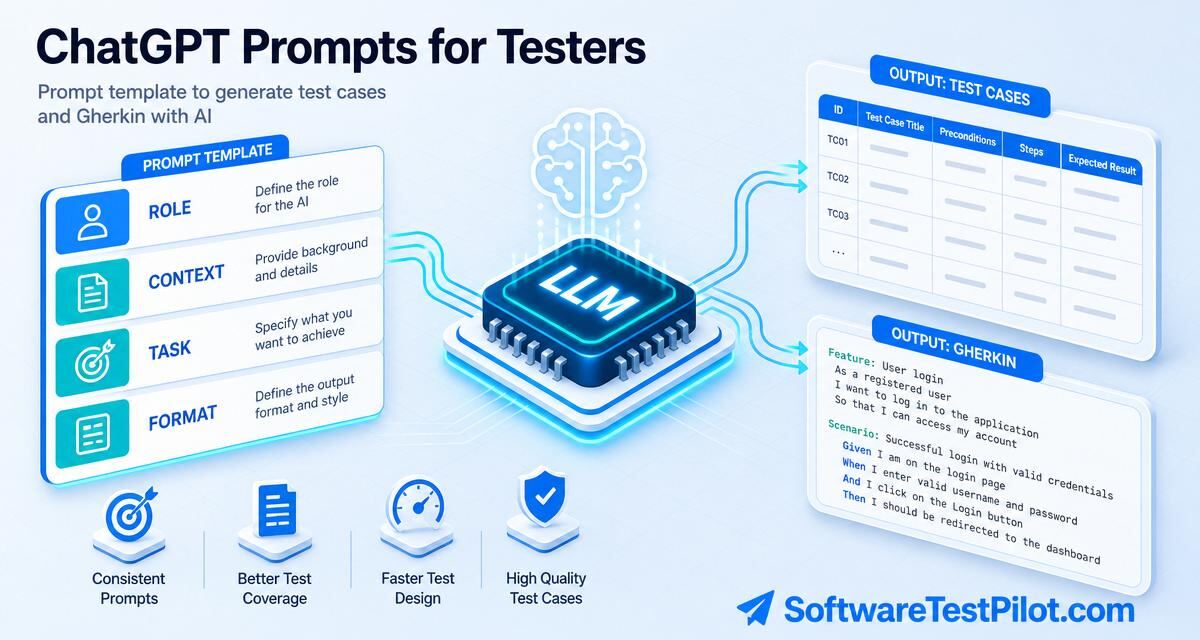
AI prompts for testers are the single biggest lever between "AI is a toy" and "AI cut my regression prep from 3 days to 3 hours." A good prompt is a spec: it names the role, grounds the model in real artefacts, states the exact task and pins the output format. This pillar consolidates "ChatGPT prompts for testers", "AI prompts for QA", "prompts for test case generation", "prompts for API testing" and "prompts for bug reports" into 40 copy-paste templates that work on every major LLM.
Pair with the LLM for QA testing playbook, ChatGPT for QA testing, and generative AI test case generation.
Key takeaways
- Every prompt uses the RCTF framework — Role, Context, Task, Format.
- Ground the model in a real artefact (spec, log, ticket). No grounding = no trust.
- End every prompt with "if unsure, say unsure — do not guess."
- Version prompts in a Git-tracked prompt library, not chat history.
- Redact PII, secrets and prod URLs before you paste anything.
1. The RCTF framework in 60 seconds
- Role — "You are a senior SDET / ISTQB-Advanced test analyst. Prioritise risk coverage, boundary values and clarity for a QA lead reviewer."
- Context — paste the requirement, user story, OpenAPI spec, page object or stack trace, plus framework + version and the compliance regime (SOC 2, HIPAA, GDPR, EU AI Act) and coverage target.
- Task — one specific artefact: "Generate 15 test cases", "Draft an IEEE 829 test plan section 4", "Write a Playwright E2E for AC-14 with an @axe accessibility check".
- Format — the exact output shape: markdown table, JSON schema, Gherkin, Vitest .test.ts. End with a rubric self-critique.
2. Prompts for test design (10)
P1 — Test cases from a user story
Role: senior SDET, ISTQB-Advanced. Apply EP + BVA. Prioritise revenue risk.
Context: [paste user story + AC + stack + compliance].
Task: 15 cases — happy, negative, boundary, security, a11y.
Format: markdown table ID/Title/Preconds/Steps/Data/Expected/Priority/Technique.
End with a 7-point self-critique against the AC list.
P2 — Gherkin (BDD) scenarios
Role: BDD analyst, Cucumber + Gherkin. Given-When-Then strictly.
Context: [story + AC].
Task: 6 scenarios — 1 happy, 3 negatives, 2 edge. Tag @smoke @regression @a11y.
Format: single .feature file.
P3 — Decision-table cases
Role: test analyst, decision-table technique.
Context: rules = [paste eligibility / pricing rules].
Task: build the decision table and derive minimum cases (2^n reduced by DT).
Format: markdown DT + case list.
P4 — State-transition cases
Role: test analyst, state-transition technique.
Context: states = [list], events = [list], guards = [list].
Task: state-transition diagram (text), 0-switch and 1-switch coverage cases.
Format: markdown.
P5 — Boundary value pack
Role: SDET. BVA specialist.
Context: field = age, range 13-120 inclusive; field = name, length 1-80.
Task: min-1, min, min+1, nominal, max-1, max, max+1 for each field.
Format: markdown table.
P6-P10 (short)
- Use-case cases — from a use-case, derive main + alternate + exception flows.
- Pairwise (all-pairs) — for N params with M values, generate the pairwise matrix.
- Risk-based cut list — cut a 400-case pack to fit a 2-hour window.
- Accessibility cases — WCAG 2.2 AA cases for a component.
- Localisation cases — RTL, unicode, plurals, date formats for a form.
3. Prompts for automation (10)
P11 — Playwright E2E from AC
Role: Playwright TS expert. Prefer getByRole/getByTestId. No sleeps.
Context: [paste AC + page HTML snippet].
Task: single .spec.ts, before/after auth via storageState, one describe per AC.
Format: complete Playwright file. End with a self-critique for flakiness sources.
P12 — Selenium 4 Java from a scenario
Role: Selenium 4 + JUnit 5 + AssertJ engineer.
Context: [scenario].
Task: Page Object + Test class with explicit waits, no Thread.sleep.
Format: two .java files.
P13 — Cypress 15 from a story
Role: Cypress 15 expert. data-cy selectors only.
Context: [story + AC].
Task: describe/it spec with cy.intercept for network + cy.session for auth.
Format: single .cy.ts.
P14-P20 (short)
- RestAssured API test from an OpenAPI endpoint.
- Playwright APIRequestContext + Zod schema validation.
- Postman collection from OpenAPI (3 cases per endpoint).
- k6 smoke test for top-10 endpoints.
- Vitest unit tests from a function.
- JUnit + Mockito from a Java class.
- Refactor for testability — propose a DI seam, then generate tests.
4. Prompts for bugs, Jira and release readiness (10)
P21 — Bug report drafter
Role: SDET writing a Jira bug a dev can fix without follow-up.
Context: [repro + screenshot description + env + logs].
Task: Title, Summary, Steps, Expected, Actual, Env, Severity, Priority,
Suggested owner. Cite the exact log line.
Format: Jira-ready markdown.
P22 — Duplicate detector
Role: triage lead.
Context: [new bug + 20 recent bug titles/summaries].
Task: is this a likely duplicate? Cite the closest matches + confidence 0-100.
Format: JSON {duplicate: bool, candidates: [{key, score, reason}]}.
P23 — Severity/priority rationale
Role: QA lead.
Context: [bug + impact + workaround + affected users %].
Task: propose Severity (S1-S4) + Priority (P1-P4) with 2-line rationale each.
Format: markdown.
P24-P30 (short)
- Root-cause hypothesis from a stack trace + last 20 commits.
- Regression test from a bug — pre-fix fails, post-fix passes.
- Release notes (QA-internal) from git log + Jira export.
- Go/no-go summary from run + bug data.
- Flaky triage cluster from 200 recent failures.
- Postmortem draft from an incident timeline.
- Test debt report from coverage + defect data.
5. Prompts for planning, exploratory and self-improvement (10)
P31 — Ambiguity finder on a user story
P32 — IEEE 829 test plan skeleton (sections 1-8)
P33 — Exploratory charter generator
P34 — SBTM session notes from a voice-note transcript
P35 — Test data (PII-safe CSV/JSON) from a schema
P36 — Coverage-gap detector from diff + tests
P37 — Retro input from 30 days of QA metrics
P38 — Prompt self-critique ("score this prompt out of 10")
P39 — Prompt library entry (name/inputs/outputs/version)
P40 — Interview drill: 10 role-specific QA questions with model answers
Full text for P31-P40 lives in our LLM for QA testing pillar section 3.
6. The 7-point prompt review rubric
- Role named and role-specific (SDET, BA, SecEng — not "assistant").
- Context grounded in a real artefact (spec, log, ticket).
- Task single and measurable ("generate 15 cases" not "help me test").
- Format pinned exactly (JSON schema / markdown table / .spec.ts file).
- Self-critique requested at the end of the output.
- Uncertainty clause — "if unsure, say unsure — do not guess."
- PII-safe — no customer data, secrets or prod URLs.
7. Governance
Any AI workflow that touches product data or code must run under governance:
- Enterprise LLM APIs with a no-training / zero-retention clause. Never a free consumer chat for customer data.
- Redact PII, PANs, JWTs, HARs, secrets and production URLs before any prompt.
- Version prompts in a Git-tracked QA prompt library. Every AI-generated artefact ships with an "AI attribution" line and a human SDET sign-off.
- Map controls to the NIST AI RMF and, for EU products, the EU AI Act.