
Test Scenario vs Test Case: Differences, Examples, and Templates (2026)
Test scenario vs test case explained with examples, templates, and interview answers. Understand when to write one over the other and how they fit into your test plan.

Last updated: July 17, 2026 · 9 min read · By SoftwareTestPilot
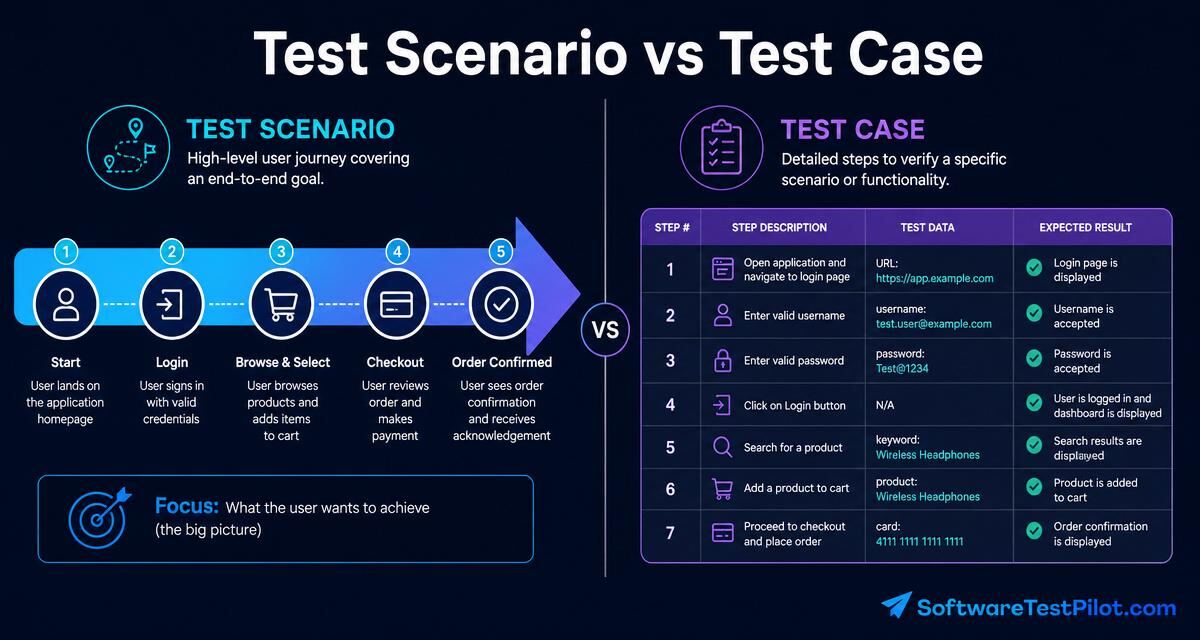
Test Scenarios and Test Cases answer two different questions. A scenario says “what do we want to verify?” A test case says “exactly which steps do we execute, with what data, and what result do we expect?” Confusing them is one of the most common mistakes in QA interviews and QA documentation alike. This guide fixes that in nine minutes.
Pair with the test case template guide and the test plan template.
Key takeaways
- A scenario is a high-level goal; a test case is a step-by-step verification of that goal.
- One scenario expands into 3–10 test cases (positive, negative, edge).
- Scenarios are written during Test Design; test cases are written during Test Case Design.
- Both are ISTQB Foundation topics and appear in every mid-level interview.
1. What is a Test Scenario?
A test scenario is a one-line description of what needs to be tested — usually a user story, a workflow, or a functional area. Example: “Verify a registered user can log in with valid credentials”. Scenarios are drafted early, from requirements, and are the bridge between business intent and executable tests.
2. What is a Test Case?
A test case is a detailed, step-by-step document that specifies preconditions, exact steps, test data, and expected results for one specific check. Example: from the scenario above, one test case is “Login with valid email and valid password” with concrete inputs and a specific expected result (redirect to dashboard, session cookie set).
3. Test scenario vs test case: side-by-side
| Aspect | Test Scenario | Test Case |
|---|---|---|
| Level | High-level, one line | Detailed, multi-step |
| Purpose | What to test | How to test it |
| Effort | Fast (minutes) | Slower (10–30 min each) |
| Format | Sentence in a matrix | Structured template (ID, steps, data, expected) |
| Author | QA lead / senior tester | QA engineer / tester |
| Coverage unit | Requirement / user story | Individual assertion |
| Ratio | 1 scenario | 3–10 test cases |
4. Worked example: online shopping login
Scenario: Verify the login functionality of an e-commerce site.
Test cases derived from that scenario:
- TC-01: Login with valid email + valid password → expect redirect to dashboard.
- TC-02: Login with valid email + invalid password → expect “Invalid credentials” error, no redirect.
- TC-03: Login with invalid email format → expect client-side validation error.
- TC-04: Login with empty password field → expect “Password required” error.
- TC-05: Login attempt after 5 failed tries → expect account-lockout message.
- TC-06: Login on mobile viewport (375px) → layout unbroken, submit works.
One scenario, six executable test cases covering positive, negative, and edge behaviour.
5. When to write scenarios vs full test cases
Write scenarios when you are: reviewing requirements, doing test design early in the sprint, building a coverage matrix, or triaging what to automate first.
Write full test cases when you are: handing work to a junior tester who needs step-by-step guidance, working in a regulated domain (finance, medical) where audit trails require it, or documenting a regression pack for repeatable execution.
Modern agile teams often write scenarios plus a shared checklist rather than 200 formal test cases. Automation covers the rest.
6. Templates
Test scenario matrix (one row per scenario):
| Scenario ID | Feature | Description | Priority | Owner |
| S-01        | Login   | Valid user can log in with correct credentials | P1 | Rita |
| S-02        | Login   | Invalid credentials show error | P1 | Rita |
Test case template:
Test Case ID: TC-01
Title: Login with valid credentials
Scenario ID: S-01
Pre-conditions: Registered user exists
Steps:
  1. Open /login
  2. Enter [email protected]
  3. Enter Password123!
  4. Click Login
Test data: valid credentials from staging seed
Expected result: Redirect to /dashboard, session cookie set
Post-conditions: Log out
Status: Pass / Fail
Defect ID (if any):
Ready-to-use versions in the test case template guide.
7. Common pitfalls
- Writing test cases before scenarios — you miss the “why” and duplicate work.
- One-to-one mapping between scenarios and test cases — you lose negative and edge coverage.
- Rewriting the scenario inside the test case title — waste of characters.
- Skipping scenario review with product / dev — misses ambiguous requirements early.
8. In interviews
Almost guaranteed at 1–3 years. Common prompts: “What is the difference between a test scenario and a test case?”, “Write scenarios and test cases for the login page”. Rehearse both on the AI Mock Interview. Deep prep: 1-year Q&A and 3-year Q&A.
9. Your 24-hour action step
Take one user story from your current sprint. Write the scenario in one line, then expand it into 5 test cases (2 positive, 2 negative, 1 edge). Add them to your test management tool. You have just closed a coverage gap in 30 minutes. Benchmark comp on the QA Salary Guide, audit your resume on the ATS Resume Reviewer.
9. 2026 scenario-first workflow — how modern teams derive cases from scenarios
In 2026, elite QA teams work scenario-first: they capture high-level behaviour in scenarios during 3-amigos, then explode each scenario into executable cases when they open the ticket. Below is the workflow and the ratios that actually work.
| Artefact | Written by | Written when | Lives in | Typical count per epic |
|---|---|---|---|---|
| Scenario | PM + Dev + QA in 3-amigos | Refinement / grooming | User story (Given/When/Then) | 3–7 |
| Test case | QA (or dev in TDD) | Sprint start | TestRail / Zephyr / code | 15–40 |
| Exploratory charter | QA | Post-build, pre-release | Session-based test mgmt tool | 1–3 |
The 1:5 rule of thumb
A well-scoped scenario expands to ~5 executable cases (happy path + 2 negative + 1 boundary + 1 error). Fewer than 3 cases per scenario usually means the scenario is under-decomposed. More than 10 cases per scenario usually means the scenario is too broad and should be split.
Scenario-to-case walkthrough — login example
- Scenario: Registered user signs in with valid credentials and lands on the dashboard.
- Case 1: Valid email + valid password → dashboard loads within 2 s, JWT set, analytics event fired.
- Case 2: Valid email + wrong password → error message, no JWT, rate-limit counter incremented.
- Case 3: Unregistered email → same error message as Case 2 (prevents user enumeration).
- Case 4: Boundary — 5th failed attempt in 60 s → account locked for 15 min, alert emitted.
- Case 5: Backend 500 during sign-in → retry banner, no infinite spinner.
See the full worked example on the login test cases guide.
Where scenarios live vs where cases live
- Scenarios belong in the ticket itself as Given/When/Then acceptance criteria. Everyone reads them; they are the shared contract.
- Cases belong in the test-management tool (or as code in the repo). Only QA + curious devs read them; they are the execution record.
- Exploratory charters belong in a session-based tool (or a Notion page). They record the unscripted testing that catches the bugs cases missed.
Interview follow-ups
- Can a test case exist without a scenario? Yes — regression cases for legacy features. But every new feature should trace to at least one scenario.
- Who owns the scenario — PM or QA? The whole 3-amigos. QA usually writes the first draft in Given/When/Then; PM signs off business intent; dev signs off feasibility.
- Do BDD scenarios replace test cases? They can, if the BDD steps are executable (Cucumber, SpecFlow). Otherwise scenarios stay in the ticket and cases live in the test tool.