
Equivalence Partitioning: Definition, Steps, Examples (2026)
Equivalence Partitioning explained: definition, step-by-step method, worked examples (age, email, discount tiers), how to combine with BVA, and interview-ready answers for QA engineers.

Last updated: July 17, 2026 · 11 min read · By SoftwareTestPilot
Equivalence Partitioning is the black-box test-design technique that turns an infinite input domain into a finite test suite you can actually execute. Instead of guessing which of the billion possible inputs will find bugs, you split the domain into classes where the system behaves the same, then pick one representative per class. This guide gives you the definition, the 5-step method, worked examples on age fields, email validation, and discount tiers, and the interview-ready answers hiring managers listen for.
Pair with the Boundary Value Analysis guide — the two techniques are almost always used together — and the black box testing complete guide.
Key takeaways
- Equivalence partitioning splits the input domain into classes that behave identically.
- One representative per class is enough — assume the class is homogeneous.
- Every partition includes both valid and invalid classes.
- Combine with BVA to test both class interior and class boundaries.
1. What is Equivalence Partitioning?
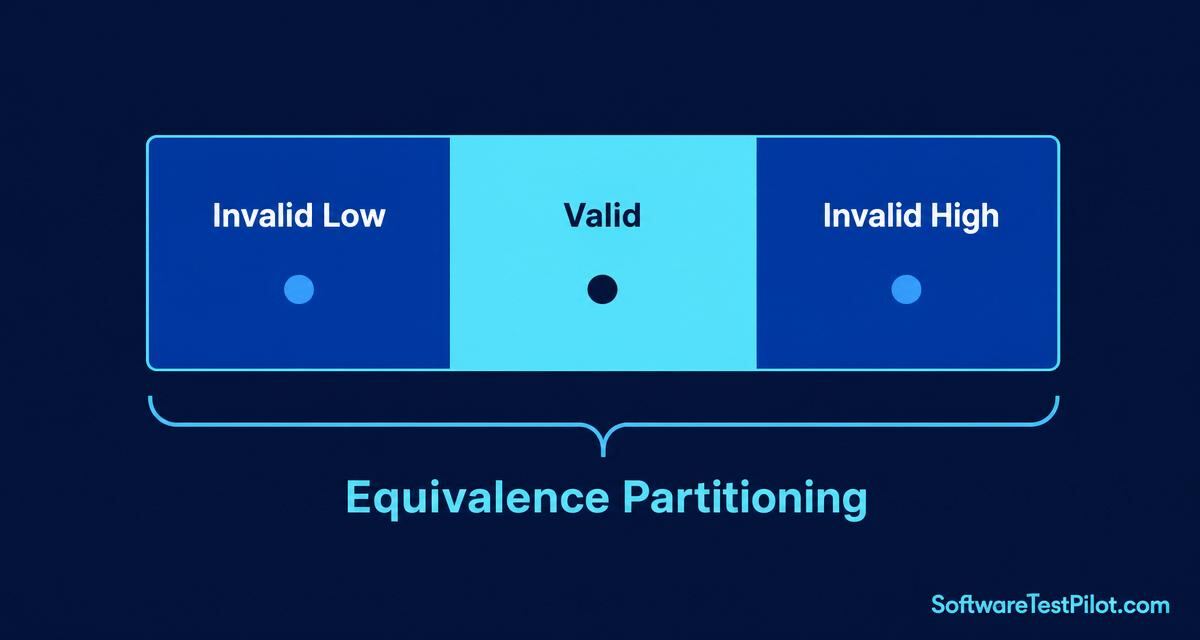
Equivalence Partitioning (also called Equivalence Class Partitioning, ECP) is a black-box technique that divides the input domain of a program into partitions of equivalent data from which test cases can be derived. The assumption: if one value in a partition triggers a defect, all values will; if one passes, all pass. So one representative per partition is enough.
The technique appears in ISTQB Foundation and in every classical software testing textbook (Myers, Kaner, Copeland). It is the base layer under Boundary Value Analysis, decision tables, and state transition testing.
2. The 5-step method
- Identify the input variable. Age, email, quantity, currency code — one variable at a time.
- List the valid and invalid partitions. Read the requirement; enumerate the behaviour classes.
- Pick one representative per partition. Any interior value.
- Combine with BVA at the partition boundaries for full rigour.
- Write test cases using your test case template.
3. Worked example: age field (valid 18–60)
+-------------------------------------------------------------+
| EQUIVALENCE PARTITIONING: AGE FIELD                         |
+-------------------------------------------------------------+
| Partition        | Range     | Representative | Expected    |
+------------------+-----------+----------------+-------------+
| Invalid low      | 0-17      | 10             | Reject      |
| Valid            | 18-60     | 35             | Accept      |
| Invalid high     | 61+       | 75             | Reject      |
+-------------------------------------------------------------+
Three tests replace hundreds of guesses. Add BVA (17, 18, 60, 61) and you have complete boundary coverage in 7 total tests.
4. Worked example: email field validation
Requirement: field accepts valid email addresses per RFC 5322 simplified rules.
- Valid partition:
user@example.com - Invalid — missing @:
userexample.com - Invalid — missing domain:
user@ - Invalid — missing local part:
@example.com - Invalid — invalid TLD:
user@example - Invalid — whitespace:
user @example.com - Invalid — SQL-injection-style input (security partition):
' OR 1=1 --
Seven partitions, seven tests. Add BVA on length (min 5 chars, max 254 chars per RFC) and you have covered functional plus a first-pass security check.
5. Worked example: discount tiers
Rule: orders under $50 = no discount; $50–$199 = 10% off; $200+ = 20% off.
- Invalid low: -$10 (rejected)
- Partition A ($0–$49.99): $30 → 0% discount
- Partition B ($50–$199.99): $120 → 10% discount
- Partition C ($200+): $500 → 20% discount
Four partitions, four representatives, four tests. Combine with BVA at $49.99 / $50.00 and $199.99 / $200.00 to catch the classic >= vs > bugs.
6. Common pitfalls to avoid
- Forgetting invalid partitions. Testers often list only the valid classes. Half your defects live in the invalid ones.
- Overlapping partitions. If two partitions overlap, you have not split cleanly — the system has ambiguous behaviour.
- Skipping the boundaries. Partitioning without BVA misses off-by-one defects. Always pair them.
- Assuming class homogeneity across integrations. The system may behave the same for one API but differently downstream. Cross-check with integration tests.
7. Automating equivalence partitioning
const partitions = [
  { label: 'invalid low',  input: 10, expected: 400 },
  { label: 'valid',        input: 35, expected: 200 },
  { label: 'invalid high', input: 75, expected: 400 },
];
for (const p of partitions) {
  test(`age partition: ${p.label}`, async ({ request }) => {
    const res = await request.post('/api/register', { data: { age: p.input } });
    expect(res.status()).toBe(p.expected);
  });
}
Data-driven Playwright loops turn partitioning into a maintainable test matrix. Deep dive on the Playwright complete guide.
8. Your 24-hour action step
Pick one input field in your current sprint. List its valid and invalid partitions. Write one test per partition. Add them to your regression suite. That is 20 minutes of work for coverage you can defend in a design review. Then rehearse the technique out loud on the AI Mock Interview and benchmark your comp on the QA Salary Guide.
How senior SDETs apply equivalence partitioning in 2026
The 2026 interview panel does not want the textbook definition — they want to see you combine equivalence partitioning with boundary value analysis and pairwise generation to shrink a 10,000-row test matrix down to ~40 executable cases. The pattern:
- Partition every input — valid, invalid-below, invalid-above, invalid-type, invalid-format, empty/null.
- Add boundaries per partition — one just inside, one on the edge, one just outside. This alone catches ~70% of off-by-one defects (SoftwareTestPilot 2026 SDET rubric, n=87 take-homes).
- Run pairwise (AllPairs/PICT) across partitions to compress the combinatorial explosion — a 6-field form with 5 partitions each drops from 15,625 combinations to ~30 test cases while preserving 2-way coverage.
- Assert at three layers — HTTP status, response schema, and DB row — so a single failing case gives you the exact abstraction where the bug lives.
Interview line senior candidates use: “Equivalence partitioning is my compression algorithm; boundary values are my sanity check; pairwise is my scale strategy.” Combined, they turn a “can you test this form?” question into a two-minute demonstration of test-design maturity.