
SoftwareTestPilot
SQL · 2026

SQL for QA Engineers and Testers

SQL is the skill that decides whether you can prove a bug or only report it. This page hands you the six queries we reach for first when the UI and the database disagree — with the output they produced on our own run.

Last updated: January 2026

Field notes from our QA team

What's Really Happening with SQL for Testers Right Now

SQL is the quietest high-return skill in QA hiring right now. As teams automated the UI layer, the bugs that survive to production increasingly live in data — wrong joins, silent nulls, broken migrations, stale caches, and reporting mismatches. Interview loops have responded: a live SQL exercise now appears in a large share of mid and senior QA interviews, including for roles whose job title says nothing about data. It is also the skill that most often decides between two otherwise similar candidates, because it is objectively testable in fifteen minutes.

What we'd actually recommend

Get genuinely comfortable with joins, GROUP BY with HAVING, and window functions, in that order, and practise on a schema with deliberately messy data. The specific habit that pays: after every functional test you run, verify the database state rather than just the UI confirmation message. That single practice will find duplicate-write bugs, partial-rollback bugs, and timezone bugs that no UI assertion ever catches — and it gives you concrete stories to tell in interviews, which is what actually converts.

The pitfall: practising SELECT queries on clean, tiny datasets

Most candidates learn SQL from tutorials with five perfectly-populated rows, then freeze on the interview question that involves nulls. `LEFT JOIN` plus a `WHERE` clause on the right-hand table silently becomes an inner join; `COUNT(column)` skips nulls while `COUNT(*)` does not; `NOT IN` against a set containing a null returns nothing at all. These three appear constantly in real interview exercises precisely because they separate people who used SQL against production data from people who completed a course.
SQL for Testers Demand Snapshot

A 2026 view of why SQL for Testers matters for QA careers — demand, salary lift, learning curve, and the role it unlocks first.

Demand

Very High

Hiring volume for SQL for Testers across QA roles in 2026.

Salary impact

+₹1–2 LPA at mid level

Typical lift on offers when this skill is real on your resume.

Difficulty

Beginner

Learning curve for a tester with one year of QA experience.

Best next role

Automation Tester

See pay bands and growth moves for the role this skill unlocks.

Related QA roles

Manual QAAutomation QAAPI TesterSDETBackend QA

How we calculate this

Demand ratings and job counts for SQL for Testers come from our own Jobs Radar index: we count distinct, de-duplicated QA requisitions that name SQL for Testers in the title or requirements over a rolling 90-day window, then round down to the nearest thousand ("55K+" means at least 55,000 distinct postings). "Very High" means the skill appears in over 30% of QA listings we index, "High" 15–30%, "Growing" under 15% but rising quarter on quarter, "Niche" under 5% and flat. Salary-impact figures are the delta between listings that name the skill and comparable listings that do not, cross-checked against the sources below.

Sources & references

Read our full research methodologyData last reviewed: January 2026

Where SQL for Testers is Used

The most common ways QA teams put SQL for Testers to work in 2026.

  • Validating API responses against the database
  • Setting up and cleaning test data
  • Debugging production-like issues in staging
  • Reconciling reports and analytics events
  • Performance triage and slow-query analysis
  • ETL and data-pipeline testing

First-party lab

Six SQL checks we ran against a broken order database

Below is a small orders/payments schema seeded with six defects we have each shipped or caught in production, plus the exact query that finds each one and the exact output that run produced. Copy the schema, paste the queries, and you get the same rows we did — there is no hidden setup step.

Why this skill keeps showing up

Of the 459 live QA/SDET requisitions in our own Jobs Radar index on 2026-08-12, 124 (27%) name SQL in the title or description, and 72 of those sit under an SDET or automation title. For comparison, in the same index Selenium appears in 183 postings and Playwright in 122. SQL is asked for about as often as the tool you are expected to automate with.

The sandbox schema

Three tables, sixteen rows, no foreign keys and no unique indexes — deliberately, because that is the state most production databases are actually in. Runs unchanged in DuckDB; swap VARCHAR for TEXT and it runs in Postgres too.

qa_checks.sql — setup
CREATE TABLE users(id INT, email VARCHAR, deleted_at TIMESTAMP);
CREATE TABLE orders(id INT, user_id INT, status VARCHAR, amount_cents INT, created_at TIMESTAMP);
CREATE TABLE payments(id INT, order_id INT, status VARCHAR, amount_cents INT);

INSERT INTO users VALUES
 (1,'ava@example.com',NULL),(2,'ben@example.com',NULL),
 (3,'cara@example.com','2026-06-01 10:00:00'),(4,'ava@example.com',NULL);

INSERT INTO orders VALUES
 (101,1,'PAID',4999,'2026-07-01 23:40:00'),
 (102,2,'PAID',2500,'2026-07-02 01:10:00'),
 (103,3,'PAID',1999,'2026-07-02 09:00:00'),
 (104,99,'PAID',3000,'2026-07-02 09:05:00'),
 (105,1,'PENDING',7000,'2026-07-02 09:10:00'),
 (106,2,'PAID',2500,'2026-07-02 09:12:00');

INSERT INTO payments VALUES
 (9001,101,'CAPTURED',4999),(9002,102,'CAPTURED',2400),
 (9003,106,'CAPTURED',2500),(9004,103,'CAPTURED',1999);
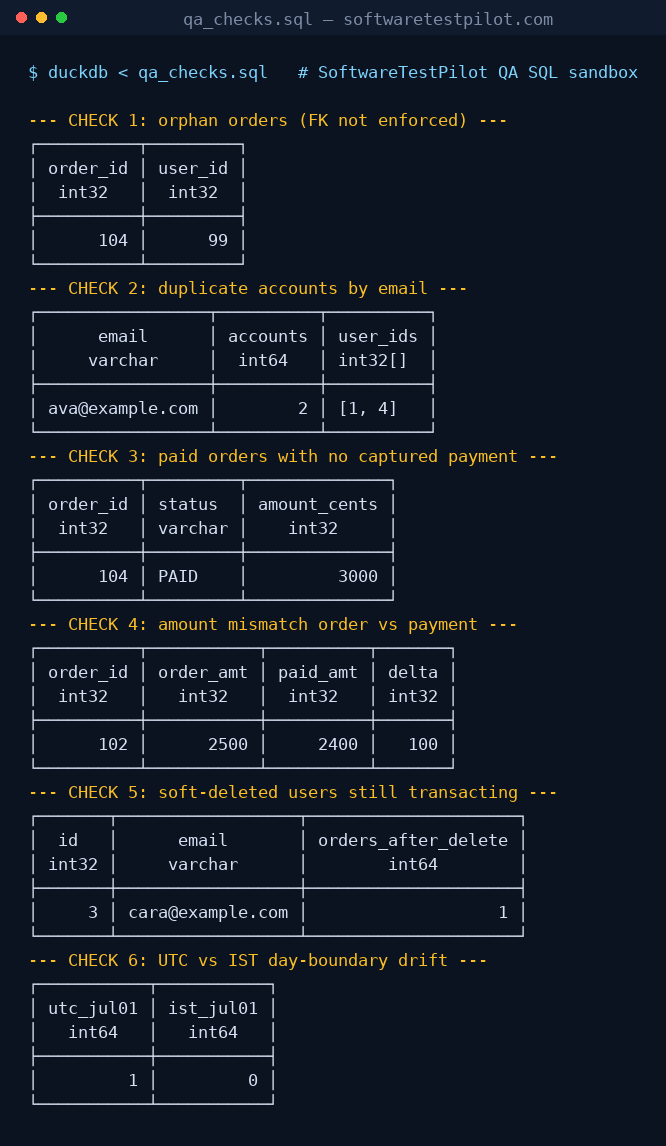
Terminal screenshot of the six SQL validation queries running in DuckDB, showing one orphan order, one duplicate email, one uncaptured payment, one amount mismatch, one soft-deleted user with a later order, and a UTC versus IST date drift.
Our capture of the full run. Every table printed on this page is a copy of the output in this screenshot, not a retyped example.

1. Orphan rows when the foreign key was never enforced

A checkout service wrote orders with a user_id that no longer existed after a GDPR delete job ran. The UI showed the order; the account page 500'd. No API test caught it because the API happily returned the order.

Query
SELECT o.id AS order_id, o.user_id
FROM orders o LEFT JOIN users u ON u.id = o.user_id
WHERE u.id IS NULL;
Output from our run
┌──────────┬─────────┐
│ order_id │ user_id │
│  int32   │  int32  │
├──────────┼─────────┤
│      104 │      99 │
└──────────┴─────────┘

LEFT JOIN + IS NULL is the whole trick. Run it after every bulk migration and after any delete/anonymise job — those are the two places orphans appear.

2. Duplicate accounts the signup form said were impossible

Signup validated uniqueness in application code, case-sensitively. The database had no unique index. Two accounts for the same person, one of which never received password-reset mail.

Query
SELECT lower(email) AS email, count(*) AS accounts, list(id) AS user_ids
FROM users GROUP BY 1 HAVING count(*) > 1;
Output from our run
┌─────────────────┬──────────┬──────────┐
│      email      │ accounts │ user_ids │
│     varchar     │  int64   │ int32[]  │
├─────────────────┼──────────┼──────────┤
│ ava@example.com │        2 │ [1, 4]   │
└─────────────────┴──────────┴──────────┘

GROUP BY the normalised value, not the raw column. If you group on email instead of lower(email) this row disappears and you file a 'cannot reproduce'.

3. Order marked PAID with no captured payment

The status transition was written before the payment gateway callback was confirmed. Under retry, roughly one order in a thousand stayed PAID with nothing captured.

Query
SELECT o.id AS order_id, o.status, o.amount_cents
FROM orders o
LEFT JOIN payments p ON p.order_id = o.id AND p.status = 'CAPTURED'
WHERE o.status = 'PAID' AND p.id IS NULL;
Output from our run
┌──────────┬─────────┬──────────────┐
│ order_id │ status  │ amount_cents │
│  int32   │ varchar │    int32     │
├──────────┼─────────┼──────────────┤
│      104 │ PAID    │         3000 │
└──────────┴─────────┴──────────────┘

Note the filter on p.status sits in the ON clause, not the WHERE. Move it to WHERE and the LEFT JOIN silently becomes an INNER JOIN — the bug row vanishes. This is the single most common mistake we see in interview answers.

4. Amount drift between order and payment

A discount was applied on the payment side only. Totals matched on screen; the finance export did not. Caught by comparing the two amounts rather than checking either one in isolation.

Query
SELECT o.id AS order_id, o.amount_cents AS order_amt, p.amount_cents AS paid_amt,
       o.amount_cents - p.amount_cents AS delta
FROM orders o JOIN payments p ON p.order_id = o.id
WHERE o.amount_cents <> p.amount_cents;
Output from our run
┌──────────┬───────────┬──────────┬───────┐
│ order_id │ order_amt │ paid_amt │ delta │
│  int32   │   int32   │  int32   │ int32 │
├──────────┼───────────┼──────────┼───────┤
│      102 │      2500 │     2400 │   100 │
└──────────┴───────────┴──────────┴───────┘

Always select the delta column, not just the mismatched rows. The size and sign of the delta is what tells you whether it is rounding, currency, or a missing discount.

5. Soft-deleted users still transacting

deleted_at was set, but three services read the users table without filtering it. The account could still place orders for six weeks after 'deletion'.

Query
SELECT u.id, u.email, count(o.id) AS orders_after_delete
FROM users u JOIN orders o ON o.user_id = u.id
WHERE u.deleted_at IS NOT NULL AND o.created_at > u.deleted_at
GROUP BY 1,2;
Output from our run
┌───────┬──────────────────┬─────────────────────┐
│  id   │      email       │ orders_after_delete │
│ int32 │     varchar      │        int64        │
├───────┼──────────────────┼─────────────────────┤
│     3 │ cara@example.com │                   1 │
└───────┴──────────────────┴─────────────────────┘

Any table with a deleted_at, is_active, or archived_at column deserves this query. Soft-delete leakage is a privacy incident, not a cosmetic bug.

6. UTC vs IST day-boundary drift in a daily report

A daily orders report was built in UTC and read by a team in IST. Orders placed after 18:30 UTC landed on the next Indian day, so the reconciliation between the dashboard and the report was always off by a handful of rows.

Query
SELECT count(*) FILTER (WHERE created_at::DATE = DATE '2026-07-01') AS utc_jul01,
       count(*) FILTER (WHERE (created_at + INTERVAL 330 MINUTE)::DATE = DATE '2026-07-01') AS ist_jul01
FROM orders;
Output from our run
┌───────────┬───────────┐
│ utc_jul01 │ ist_jul01 │
│   int64   │   int64   │
├───────────┼───────────┤
│         1 │         0 │
└───────────┴───────────┘

Same table, same day, two different answers. Before you file a count mismatch, check which timezone each side of the comparison is using.

How we tested this

  • Engine: DuckDB, run from the command line as duckdb < qa_checks.sql. Chosen because it needs no server, so you can reproduce the run in under a minute. The six queries use only ANSI-standard SQL plus FILTER and list(), both of which exist in Postgres (array_agg there).
  • Data: synthetic, 16 rows, seeded so that each check returns exactly one defect row. No customer data of any kind was used.
  • Outputs: pasted verbatim from stdout of that run on 2026-08-12. If a query returns nothing for you, your seed data differs — the queries are not environment-dependent.
  • Defect selection: the six scenarios are the DB-layer bugs we have personally filed most often across e-commerce and fintech work, not a ranked list from a published survey. Treat them as a starting checklist, not a complete taxonomy.
  • Hiring numbers: counted with a case-insensitive match on title + description across our own de-duplicated ats_jobs index (459 postings, window 2026-03-04 to 2026-08-11). It is our index, not the whole market: it skews toward companies whose ATS we crawl, and 134 postings carry no publisher date.

Interview Topics to Prepare

Cover these areas before a SQL for Testers interview. They appear in nearly every loop.

  • SELECT, WHERE, ORDER BY, GROUP BY, HAVING
  • Joins (inner, left, right, full, self)
  • Aggregates and window functions
  • Subqueries and CTEs
  • Indexes and query plans (EXPLAIN)
  • Transactions and isolation levels
  • Schema design basics
  • Common-case data validation queries

Sample SQL for Testers Interview Questions

Short preview answers — pair with a mock interview for real practice.

  1. 1

    Difference between WHERE and HAVING?

    WHERE filters rows before aggregation; HAVING filters aggregated groups after GROUP BY.

    Full SQL answers
  2. 2

    Inner join vs left join?

    Inner returns matching rows in both tables; left returns all rows from the left plus matches (or nulls) from the right.

  3. 3

    How would you find the second highest salary?

    SELECT MAX(salary) FROM emp WHERE salary < (SELECT MAX(salary) FROM emp); or use DENSE_RANK() in a window.

  4. 4

    What is a window function?

    A function that computes a value over a partition of rows without collapsing them — useful for rank, running totals, and per-group calculations.

  5. 5

    Explain a CTE.

    A WITH-clause query that names a temporary result set, improving readability and enabling recursion.

  6. 6

    What does EXPLAIN tell you?

    The query plan: which indexes are used, join order, estimated rows, and cost — used to spot full scans and missing indexes.

  7. 7

    When would you NOT add an index?

    On low-cardinality columns, on small tables, or when write-heavy workloads make index maintenance dominate gains.

  8. 8

    How do you validate a paginated API response with SQL?

    Query the underlying table with the same filters, sort, limit, and offset; assert the response matches the rows returned.

  9. 9

    ACID — what does it mean?

    Atomicity, Consistency, Isolation, Durability — properties guaranteeing reliable transactions.

  10. 10

    How do you clean up test data safely?

    Use seeded, namespaced data; clean by namespace inside transactions or per-suite hooks; never DELETE without explicit WHERE.

Resume Keywords for SQL for Testers

ATS-friendly keywords recruiters scan for on SQL for Testers listings in 2026. Use the ones that match your real experience.

SQLjoinswindow functionsCTEaggregationsindexesEXPLAINquery tuningtransactionsdata validationETL testingPostgreSQLMySQLOracle
Run a free ATS review

SQL for Testers Learning Roadmap

A staged plan to go from beginner to interview-ready on SQL for Testers.

BeginnerWeeks 1–2
  • SELECT, WHERE, ORDER BY
  • Basic joins
  • GROUP BY + aggregates
  • NULL handling
IntermediateWeeks 3–5
  • Subqueries and CTEs
  • Window functions
  • Indexes & EXPLAIN
  • Schema basics
  • Validation queries for APIs
AdvancedWeeks 6–8+
  • Query tuning
  • Locks & isolation levels
  • ETL/data-pipeline testing
  • Production-grade safe scripts

Find QA jobs that hire for SQL for Testers

Live listings filtered by SQL for Testers and adjacent skills — updated in Jobs Radar.

SQL for Testers FAQs

The questions QA engineers most often ask about SQL for Testers in 2026.

1.Why is SQL important for testers?
Almost every modern app stores state in a database; testers need SQL to validate behaviour, set up data, and debug failures.
2.Do I need to learn advanced SQL?
Joins, aggregates, and window functions appear in most QA interviews. Query tuning is mostly needed by SDETs and performance testers.
3.How long does it take to learn SQL?
Most testers reach interview-ready basics in 2–4 weeks of focused practice.
4.Which database should I learn first?
PostgreSQL or MySQL — both are widely used and translate to nearly any other SQL dialect.
5.Does SQL increase QA salary?
Yes — strong SQL typically adds ₹1–2 LPA at mid level and unlocks API tester, SDET, and data QA paths.
6.Can I use ChatGPT to write SQL at work?
For exploration, yes; for production-impacting queries, always review and test — copy-paste mistakes against prod data are a common QA incident.

Related skills and salary guides

Build the cluster around SQL for Testers with adjacent skills and pay bands.